Back to Products
 0.0 (0 reviews)



Bestseller
Expert Advisors
TwisterPro Scalper EA MT5 Scalping Robot | Myfxbook Verified | Advanced Forex Scalping Expert Advisor
$699.00
$16.99
97.57% OFFTwisterPro Scalper EA MT5 is an automated Forex trading robot designed for MetaTrader 5. It focuses on high-probability scalping opportunities by opening and managing short-term trades during favorable market conditions. The EA aims to minimize market exposure while seeking consistent trading opportunities using advanced entry and exit algorithms. The robot is designed for traders who prefer automated execution, disciplined risk management, and hands-free trading while maintaining complete control over money management settings.
What is TwisterPro Scalper EA MT5?
TwisterPro Scalper EA MT5 is an automated Forex trading robot designed for MetaTrader 5. It focuses on high-probability scalping opportunities by opening and managing short-term trades during favorable market conditions. The EA aims to minimize market exposure while seeking consistent trading opportunities using advanced entry and exit algorithms.
The robot is designed for traders who prefer automated execution, disciplined risk management, and hands-free trading while maintaining complete control over money management settings.
The robot is designed for traders who prefer automated execution, disciplined risk management, and hands-free trading while maintaining complete control over money management settings.
Recommended Trading Currency Pairs
TwisterPro Scalper EA MT5 performs best on highly liquid currency pairs with tight spreads, including:
✅ EUR/USD
✅ GBP/USD
✅ USD/JPY
✅ AUD/USD
✅ USD/CAD
✅ EUR/JPY
✅ GBP/JPY (for experienced traders)
For optimal performance, use a broker offering ECN accounts with low spreads and fast execution.
✅ EUR/USD
✅ GBP/USD
✅ USD/JPY
✅ AUD/USD
✅ USD/CAD
✅ EUR/JPY
✅ GBP/JPY (for experienced traders)
For optimal performance, use a broker offering ECN accounts with low spreads and fast execution.
TwisterPro Scalper EA MT5 Features
Fully automated MT5 Expert Advisor
Advanced scalping strategy
Intelligent trade entry algorithm
Dynamic stop loss and take profit management
Built-in money management system
Adjustable lot sizing
News trading filter support
Spread protection
Slippage protection
Magic Number support
Multiple currency pair compatibility
Optimized for VPS hosting
Low latency execution
Custom trading hours
Compatible with MetaTrader 5
TwisterPro Scalper EA MT5 – Best Settings
For balanced performance, consider the following recommendations:
✅ Platform: MetaTrader 5
✅ Timeframe: M1 or M5
✅ Account Type: ECN or Raw Spread
✅ Minimum Deposit: $200–$500
✅ Leverage: 1:100 or higher
✅ Auto Trading: Enabled
✅ VPS: Highly recommended
✅ Risk Per Trade: 1–2% of account balance
✅ Maximum Spread Filter: 20 points or lower
✅ Trading Sessions: London and New York sessions generally provide the best liquidity.
Always forward-test on a demo account before using live funds.
✅ Platform: MetaTrader 5
✅ Timeframe: M1 or M5
✅ Account Type: ECN or Raw Spread
✅ Minimum Deposit: $200–$500
✅ Leverage: 1:100 or higher
✅ Auto Trading: Enabled
✅ VPS: Highly recommended
✅ Risk Per Trade: 1–2% of account balance
✅ Maximum Spread Filter: 20 points or lower
✅ Trading Sessions: London and New York sessions generally provide the best liquidity.
Always forward-test on a demo account before using live funds.
Instructions for Installing TwisterPro Scalper EA MT5
✅ Download the TwisterPro Scalper EA MT5 files.
✅ Open MetaTrader 5.
✅ Select File → Open Data Folder.
✅ Open MQL5 → Experts.
✅ Copy the EA file into the Experts folder.
✅ Restart MetaTrader 5.
✅ Open the Navigator panel.
✅ Locate TwisterPro Scalper EA.
✅ Drag the EA onto your preferred currency chart.
✅ Enable Allow Algo Trading.
✅ Configure your preferred risk and money management settings.
✅ Click OK and ensure AutoTrading is enabled.
✅ Open MetaTrader 5.
✅ Select File → Open Data Folder.
✅ Open MQL5 → Experts.
✅ Copy the EA file into the Experts folder.
✅ Restart MetaTrader 5.
✅ Open the Navigator panel.
✅ Locate TwisterPro Scalper EA.
✅ Drag the EA onto your preferred currency chart.
✅ Enable Allow Algo Trading.
✅ Configure your preferred risk and money management settings.
✅ Click OK and ensure AutoTrading is enabled.
Who Should Use TwisterPro Scalper EA MT5?
TwisterPro Scalper EA MT5 is suitable for:
✅ Beginner traders seeking automation
✅ Intermediate Forex traders
✅ Professional traders
✅ Busy individuals unable to monitor charts continuously
✅ VPS users
✅ Traders preferring disciplined risk management
✅ Traders focusing on major Forex pairs
✅ Investors building diversified automated trading portfolios
✅ Beginner traders seeking automation
✅ Intermediate Forex traders
✅ Professional traders
✅ Busy individuals unable to monitor charts continuously
✅ VPS users
✅ Traders preferring disciplined risk management
✅ Traders focusing on major Forex pairs
✅ Investors building diversified automated trading portfolios
Download TwisterPro Scalper EA MT5
Download TwisterPro Scalper EAPros and Cons
Pros
Fully automated trading
Fast scalping execution
User-friendly installation
Adjustable risk management
Supports multiple currency pairs
Optimized for MetaTrader 5
VPS compatible
Suitable for ECN brokers
Customizable trading parameters
Cons
Requires low spread broker
VPS recommended for best execution
Scalping performance depends on broker execution quality
Market volatility may affect results
Demo testing is recommended before live deployment
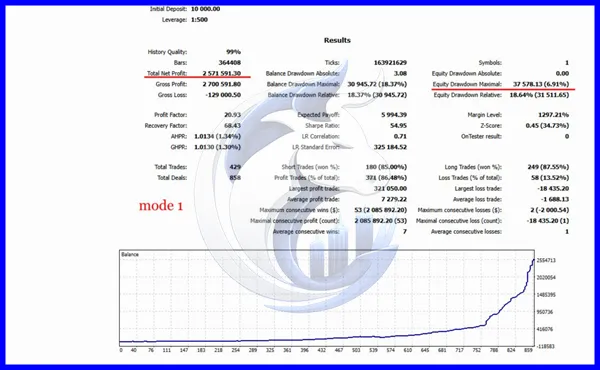
Backtest Results
Conclusion
TwisterPro Scalper EA MT5 is designed for traders seeking an automated scalping solution on the MetaTrader 5 platform. Its customizable money management, intelligent trade execution, and compatibility with major currency pairs make it an attractive option for traders looking to automate their Forex strategies.
Like any Expert Advisor, long-term success depends on broker quality, proper risk management, market conditions, and realistic expectations. Testing the EA on a demo account and using conservative risk settings can help traders evaluate its suitability before transitioning to a live trading environment.
Like any Expert Advisor, long-term success depends on broker quality, proper risk management, market conditions, and realistic expectations. Testing the EA on a demo account and using conservative risk settings can help traders evaluate its suitability before transitioning to a live trading environment.
What's Included
File Size
2.68MB
File Type
ZIP
Downloads
79
Login to add your review.
jevintyler23@gmail.com
Jun 28, 2026
The EA works smoothly on EUR/USD with my ECN broker. Low spreads definitely improve performance.
It is designed exclusively for MetaTrader 5 (MT5).
Major Forex pairs such as EUR/USD, GBP/USD, USD/JPY, AUD/USD, and USD/CAD generally provide the best trading conditions.
The EA is typically optimized for M1 and M5 charts.
While not mandatory, a VPS is highly recommended for faster execution and uninterrupted trading.
A starting balance between $200 and $500 is commonly recommended, depending on your chosen risk level.
Yes. The user-friendly interface and automated execution make it suitable for beginners, although learning basic risk management is still important.
Yes. The EA provides adjustable lot sizing and customizable risk management settings.
Yes. It supports trading on multiple currency pairs, provided your computer or VPS has sufficient resources.
Yes. Using an ECN broker with low spreads and fast execution can significantly improve scalping performance.
Absolutely. Forward testing on a demo account is recommended to ensure the settings suit your broker and trading objectives.