Back to Products
 0.0 (0 reviews)

Featured
Bestseller
Expert Advisors
Range Breakout EA v5.20 MT5 + SET Files – Smart Forex Breakout Trading
$569.00
$16.99
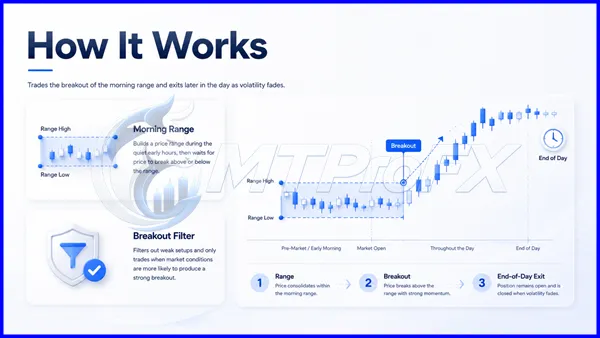
97.01% OFFRange Breakout EA with Range Filters v5.20 MT5 + SET FILES is an automated Expert Advisor designed for MetaTrader 5 traders who want to explore range-breakout strategies with additional range-based filtering. The EA is built around identifying defined market ranges and looking for potential breakout opportunities when price moves beyond important range boundaries.
What is Range Breakout EA with Range Filters v5.20 MT5 + SET Files?
Range Breakout EA with Range Filters v5.20 MT5 + SET FILES is an automated Expert Advisor designed for MetaTrader 5 traders who want to explore range-breakout strategies with additional range-based filtering. The EA is built around identifying defined market ranges and looking for potential breakout opportunities when price moves beyond important range boundaries.
The included SET files can make the initial setup easier by providing predefined parameter configurations that traders can load and then adjust according to their broker, risk tolerance, trading session, and preferred currency pair.
Important: Expert Advisor performance can vary significantly depending on market conditions, spread, broker execution, leverage, settings, and risk management. Backtest and demo-test the EA before using it with real funds.
The included SET files can make the initial setup easier by providing predefined parameter configurations that traders can load and then adjust according to their broker, risk tolerance, trading session, and preferred currency pair.
Important: Expert Advisor performance can vary significantly depending on market conditions, spread, broker execution, leverage, settings, and risk management. Backtest and demo-test the EA before using it with real funds.
Recommended Trading Currency Pairs
The EA can be evaluated on major and selected cross pairs where sufficient liquidity and volatility are available.
Recommended pairs to test:
☑️ EUR/USD – High liquidity and generally tight spreads.
☑️ GBP/USD – Suitable for traders looking for stronger intraday movements.
☑️ USD/JPY – Can provide clean directional movements during active sessions.
☑️ AUD/USD – Useful for testing range-breakout behavior in a liquid market.
☑️ USD/CAD – Can offer breakout opportunities around active trading periods.
☑️ EUR/JPY – A more volatile cross pair worth testing with conservative risk settings.
☑️ GBP/JPY – Higher volatility; use lower risk and carefully evaluate drawdown.
For best results, traders should perform individual backtests because the optimal pair can differ depending on the broker and EA configuration.
Recommended pairs to test:
☑️ EUR/USD – High liquidity and generally tight spreads.
☑️ GBP/USD – Suitable for traders looking for stronger intraday movements.
☑️ USD/JPY – Can provide clean directional movements during active sessions.
☑️ AUD/USD – Useful for testing range-breakout behavior in a liquid market.
☑️ USD/CAD – Can offer breakout opportunities around active trading periods.
☑️ EUR/JPY – A more volatile cross pair worth testing with conservative risk settings.
☑️ GBP/JPY – Higher volatility; use lower risk and carefully evaluate drawdown.
For best results, traders should perform individual backtests because the optimal pair can differ depending on the broker and EA configuration.
Range Breakout EA with Range Filters v5.20 MT5 + SET Files Features
Automated range breakout trading
Range filter functionality
MetaTrader 5 compatibility
SET files included
Automated entry and trade-management capabilities
Designed to identify potential price expansion after consolidation
Adjustable trading parameters
Suitable for systematic strategy testing
Can reduce the need for manual breakout monitoring
Useful for testing different currency pairs and market sessions
Configurable risk and trading parameters
Supports automated execution through MT5
Range Breakout EA with Range Filters v5.20 MT5 + SET Files – Best Settings
There is no universal "best" configuration because the optimal parameters depend on the currency pair, broker conditions, timeframe, spread, and risk profile.
For an initial setup, traders can start with the included SET files rather than changing numerous parameters immediately. Load the appropriate SET file, run a backtest, and compare the results against alternative configurations.
Recommended configuration approach
☑️ Currency Pair: Start with EUR/USD, GBP/USD, USD/JPY, and AUD/USD.
☑️ Timeframe: Test the timeframe recommended by the supplied SET file first. If no timeframe is specified, evaluate multiple intraday timeframes in the MT5 Strategy Tester.
☑️ Risk: Begin conservatively. Avoid using aggressive lot multipliers simply because a backtest shows higher returns.
☑️ Range Filter: Keep the supplied range-filter configuration initially, then optimize gradually. Changing several filter parameters simultaneously can lead to over-optimization.
☑️ Spread: Test using realistic spread assumptions rather than artificially low spreads.
☑️ Trading Session: Compare London, New York, and overlapping sessions to determine where the strategy performs most consistently.
☑️ Maximum Drawdown: Select settings based on acceptable drawdown rather than maximum historical profit alone.
☑️ Optimization: Test separate periods for optimization and validation. A configuration that performs well only on one historical period may be curve-fitted.
For an initial setup, traders can start with the included SET files rather than changing numerous parameters immediately. Load the appropriate SET file, run a backtest, and compare the results against alternative configurations.
Recommended configuration approach
☑️ Currency Pair: Start with EUR/USD, GBP/USD, USD/JPY, and AUD/USD.
☑️ Timeframe: Test the timeframe recommended by the supplied SET file first. If no timeframe is specified, evaluate multiple intraday timeframes in the MT5 Strategy Tester.
☑️ Risk: Begin conservatively. Avoid using aggressive lot multipliers simply because a backtest shows higher returns.
☑️ Range Filter: Keep the supplied range-filter configuration initially, then optimize gradually. Changing several filter parameters simultaneously can lead to over-optimization.
☑️ Spread: Test using realistic spread assumptions rather than artificially low spreads.
☑️ Trading Session: Compare London, New York, and overlapping sessions to determine where the strategy performs most consistently.
☑️ Maximum Drawdown: Select settings based on acceptable drawdown rather than maximum historical profit alone.
☑️ Optimization: Test separate periods for optimization and validation. A configuration that performs well only on one historical period may be curve-fitted.
Instructions for Installing Range Breakout EA with Range Filters v5.20 MT5 + SET Files
☑️ Step 1 – Install MetaTrader 5
Download and install MetaTrader 5 (MT5) from your broker or MetaQuotes-supported source.
☑️ Step 2 – Locate the Expert Advisors folder
Open MT5 and navigate to:
File → Open Data Folder → MQL5 → Experts
Copy the Range Breakout EA with Range Filters v5.20 EA file into the Experts folder.
☑️ Step 3 – Install the EA
Restart MetaTrader 5 or refresh the Expert Advisors section in the Navigator window.
The EA should then appear under:
Navigator → Expert Advisors
☑️ Step 4 – Attach the EA to a chart
Open the currency pair and timeframe you want to test. Drag the EA onto the chart and enable Algo Trading.
☑️ Step 5 – Load the SET file
Open the EA's Inputs section and select the appropriate Load option. Choose the supplied .set file.
Review the parameters before confirming the configuration.
☑️ Step 6 – Test before live trading
Use the MT5 Strategy Tester to evaluate historical performance. After backtesting, run the EA on a demo account before considering live deployment.
Download and install MetaTrader 5 (MT5) from your broker or MetaQuotes-supported source.
☑️ Step 2 – Locate the Expert Advisors folder
Open MT5 and navigate to:
File → Open Data Folder → MQL5 → Experts
Copy the Range Breakout EA with Range Filters v5.20 EA file into the Experts folder.
☑️ Step 3 – Install the EA
Restart MetaTrader 5 or refresh the Expert Advisors section in the Navigator window.
The EA should then appear under:
Navigator → Expert Advisors
☑️ Step 4 – Attach the EA to a chart
Open the currency pair and timeframe you want to test. Drag the EA onto the chart and enable Algo Trading.
☑️ Step 5 – Load the SET file
Open the EA's Inputs section and select the appropriate Load option. Choose the supplied .set file.
Review the parameters before confirming the configuration.
☑️ Step 6 – Test before live trading
Use the MT5 Strategy Tester to evaluate historical performance. After backtesting, run the EA on a demo account before considering live deployment.
Who Should Use Range Breakout EA with Range Filters v5.20 MT5 + SET Files?
Range Breakout EA with Range Filters v5.20 MT5 + SET FILES may be suitable for:
☑️ Forex traders interested in automated breakout systems
☑️ MT5 users who prefer algorithmic trading
☑️ Traders testing range-expansion strategies
☑️ Beginners who want to experiment with predefined SET files
☑️ Experienced traders who want customizable EA parameters
☑️ Traders interested in systematic backtesting
☑️ Users who want to reduce manual breakout monitoring
It may be less suitable for traders expecting guaranteed profits or completely hands-off trading without monitoring risk.
☑️ Forex traders interested in automated breakout systems
☑️ MT5 users who prefer algorithmic trading
☑️ Traders testing range-expansion strategies
☑️ Beginners who want to experiment with predefined SET files
☑️ Experienced traders who want customizable EA parameters
☑️ Traders interested in systematic backtesting
☑️ Users who want to reduce manual breakout monitoring
It may be less suitable for traders expecting guaranteed profits or completely hands-off trading without monitoring risk.
Download Range Breakout EA with Range Filters v5.20 MT5 + SET Files
Download Range Breakout EA v5.20 MT5Pros and Cons
Pros
Automated breakout strategy
Includes range-filter functionality
MT5 compatible
SET files simplify initial configuration
Can be tested across multiple currency pairs
Supports systematic backtesting
Reduces emotional manual entries
Adjustable parameters provide flexibility
Cons
Results can vary between brokers
Breakout strategies can experience false breakouts
High-volatility events may increase drawdown
Optimization can produce curve-fitted results
Requires appropriate risk management
Historical performance does not guarantee future results
Aggressive settings can substantially increase account risk
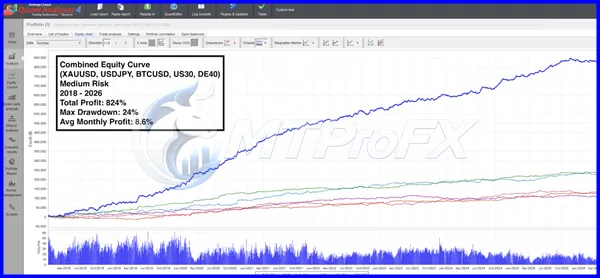
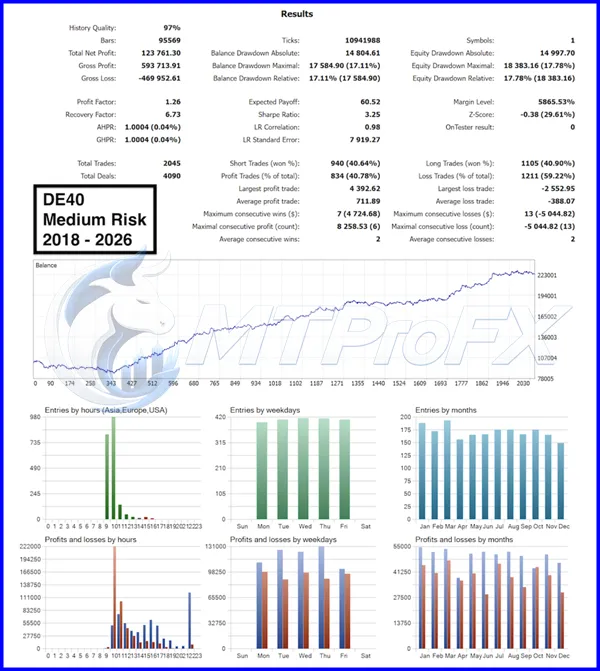
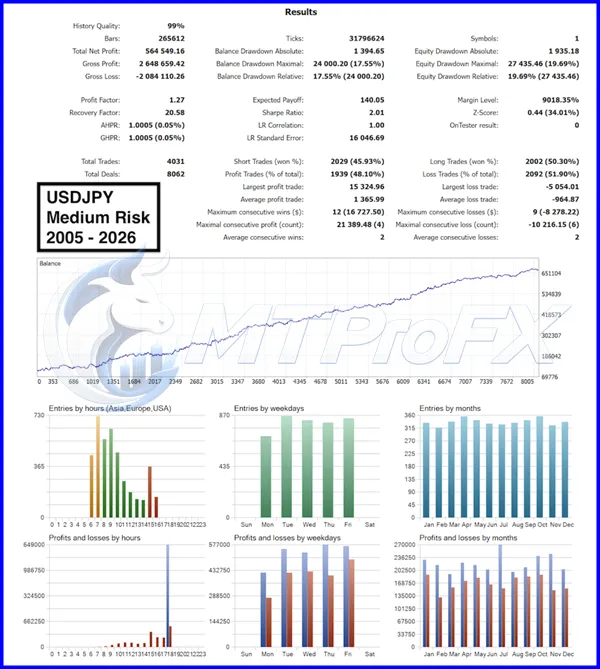
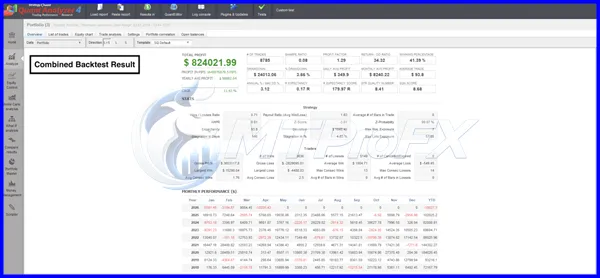
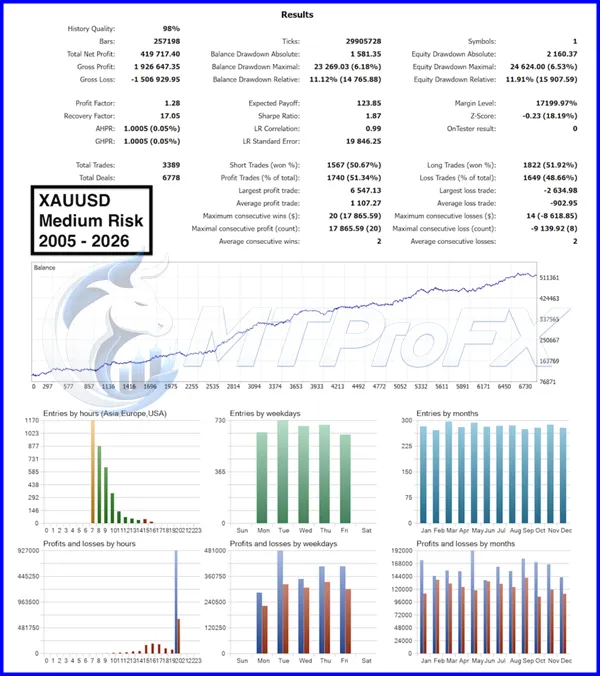
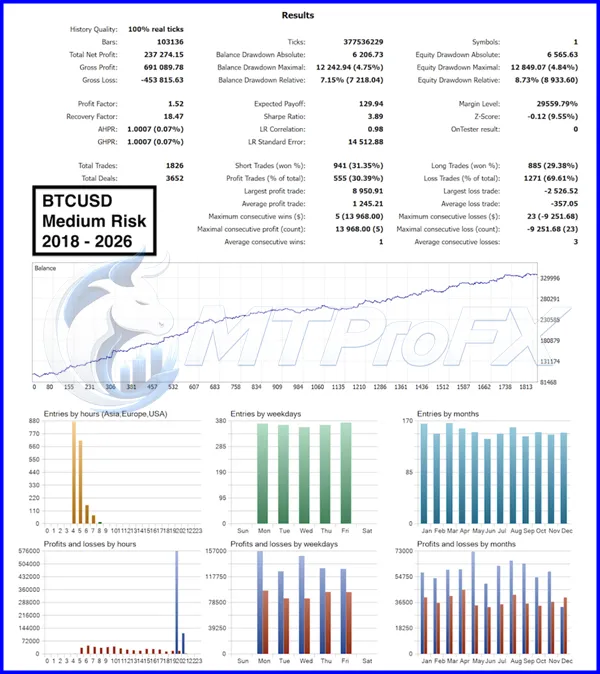
Backtest Results
Conclusion
Range Breakout EA with Range Filters v5.20 MT5 + SET FILES provides traders with an automated approach to testing range-breakout opportunities through MetaTrader 5. Its combination of breakout logic, range filtering, configurable parameters, and supplied SET files makes it a practical tool for traders interested in systematic forex strategy testing.
The most important step is not simply finding the setting with the highest historical return. Instead, focus on robustness, realistic backtesting, controlled drawdown, sensible risk management, and forward-testing. With disciplined testing, the EA can serve as a useful addition to an automated MT5 trading toolkit.
The most important step is not simply finding the setting with the highest historical return. Instead, focus on robustness, realistic backtesting, controlled drawdown, sensible risk management, and forward-testing. With disciplined testing, the EA can serve as a useful addition to an automated MT5 trading toolkit.
What's Included
File Size
2.27MB
File Type
ZIP
Downloads
431
Login to add your review.
marcusresin@gmail.com
Sep 14, 2026
I've been testing it on several major pairs. Results vary between pairs, so proper optimization and risk control are definitely important.
It is an automated MetaTrader 5 Expert Advisor designed around range-breakout trading with additional range-filter conditions.
Yes. This version is designed for MetaTrader 5.
Yes, the topic specifies SET files, which can be loaded into the EA's input parameters to simplify the initial configuration.
Major pairs such as EUR/USD, GBP/USD, USD/JPY, and AUD/USD are good starting points for testing. More volatile crosses can also be evaluated with appropriate risk controls.
No EA can guarantee profits. Results depend on market conditions, settings, broker execution, spread, trading costs, and risk management.
Yes, beginners can use it for learning and demo testing, particularly because SET files can simplify the initial configuration. However, users should understand basic MT5 operation and forex risk management.
The supplied SET files are useful starting configurations, but they should be backtested and forward-tested on your own broker before live deployment.
Technically, an MT5 EA can be deployed on a live account, but it is strongly recommended to complete historical testing and demo forward-testing first.
A VPS is not necessarily required for backtesting, but traders running an EA continuously may benefit from a reliable VPS to reduce interruptions caused by computer shutdowns or unstable internet connections.
The ideal timeframe depends on the EA's configuration and the selected SET file. Test the supplied configuration first and compare results across appropriate intraday timeframes.