Quantum Queen X EA MT5 v4.3 Source Code – Myfxbook Verified AI Scalping & Hedging Expert Advisor
$16.99
97.39% OFFQuantum Queen X EA MT5 v4.3 Source Code is an automated Expert Advisor designed for the MetaTrader 5 (MT5) platform. The EA can be used to automate forex trading strategies while providing access to its source code for traders and developers who want to examine, customize, or further optimize the trading logic. Quantum Queen X EA MT5 v4.3 is positioned as a flexible automated trading solution with features such as automated entries, configurable risk management, trading-session controls, and strategy customization. Because EA performance depends heavily on broker conditions, market volatility, account configuration, and settings, users should test the system on a demo account before considering live deployment.
What is Quantum Queen X EA MT5 v4.3?
Unlike a compiled-only EA, source-code access can be useful for experienced traders and developers who want greater visibility into the EA's trading logic. Depending on the supplied version and configuration, users may be able to adjust parameters related to entries, position management, risk, trading sessions, and other operational controls.
The EA should not be considered a guaranteed-profit system. Automated trading systems can experience losing trades, drawdowns, slippage, spread-related issues, and changing market conditions.
Recommended Trading Currency Pairs
Recommended pairs to test include:
✅ EURUSD – Popular major pair with high liquidity.
✅ GBPUSD – Suitable for testing strategies that handle greater volatility.
✅ USDJPY – A highly traded major pair with generally strong liquidity.
✅ AUDUSD – Useful for diversified forex testing.
✅ USDCAD – Can be included in multi-pair testing.
✅ EURGBP – A lower-volatility cross that may be useful for diversification.
The best pair ultimately depends on the EA's actual strategy logic and backtesting results. Avoid assuming that a setting optimized for one pair will perform equally well on another.
Recommended Timeframes
For initial testing, traders can evaluate the EA across commonly used MT5 timeframes such as:
✅ M5 – Suitable when the strategy is designed for shorter-term trading.
✅ M15 – A practical timeframe for many automated strategies.
✅ M30 – Useful for reducing some market noise.
✅ H1 – Appropriate for testing slower trading approaches.
The optimal timeframe should be determined through historical testing and forward testing rather than assumed solely from the EA name.
Quantum Queen X EA MT5 v4.3 Features
Quantum Queen X EA MT5 v4.3 – Best Settings
For safer evaluation:
✅ Start with a demo account.
✅ Use conservative risk settings during the initial forward test.
✅ Begin with one or two highly liquid major pairs.
✅ Test the EA on M5, M15, and H1 to identify suitable behavior.
✅ Use realistic spread and commission assumptions during backtesting.
✅ Avoid excessively high lot sizes.
✅ Test different market periods rather than relying on a single historical period.
✅ Forward-test optimized settings before considering live deployment.
✅ Avoid changing numerous parameters simultaneously.
✅ Keep a record of drawdown, recovery behavior, win rate, average trade, and risk-to-reward characteristics.
For users with access to the source code, parameter optimization should be performed carefully to reduce the risk of curve fitting.
Instructions for Installing Quantum Queen X EA MT5 v4.3
Download and install the MetaTrader 5 desktop terminal from your broker or the official MetaTrader distribution.
✅ Step 2: Open the MT5 Data Folder
Inside MetaTrader 5, select:
File → Open Data Folder
Then navigate to:
MQL5 → Experts
✅ Step 3: Add the EA Source Code
Copy the supplied Quantum Queen X EA v4.3 source file into the appropriate MQL5 directory.
If the package contains supporting files, libraries, indicators, or include files, place them in their corresponding MQL5 folders.
✅ Step 4: Compile the Source Code
Open MetaEditor from MT5 and locate the EA source file.
Open the file and select Compile.
Check the compilation results for errors before continuing.
✅ Step 5: Refresh the Navigator
Return to MetaTrader 5 and refresh the Expert Advisors section.
The EA should appear under:
Navigator → Expert Advisors
✅ Step 6: Attach the EA to a Chart
Open the desired currency pair and timeframe, then drag Quantum Queen X EA onto the chart.
Configure the available parameters according to your testing plan.
✅ Step 7: Enable Automated Trading
Make sure the MT5 automated-trading function is enabled.
✅ Step 8: Backtest Before Live Trading
Open:
View → Strategy Tester
Select the EA, currency pair, timeframe, testing period, and appropriate modeling conditions.
Review the results before proceeding to forward testing.
Who Should Use Quantum Queen X EA MT5 v4.3?
✅ Forex traders interested in automated trading.
✅ MT5 users who want to experiment with Expert Advisors.
✅ Advanced traders who understand automated risk management.
✅ Developers interested in examining or modifying EA source code.
✅ Traders who want to perform their own backtesting and optimization.
✅ Users looking for a customizable automated trading framework.
It may not be suitable for beginners who expect an EA to generate guaranteed returns without monitoring, testing, or risk management.
Download Quantum Queen X EA MT5 v4.3
Download Quantum Queen X EA MT5Pros and Cons
Pros
Cons
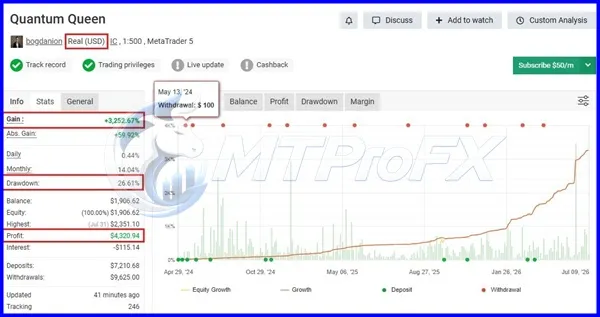
Backtest Results



Final Verdict – Is Quantum Queen X EA MT5 v4.3 Worth It?
For the best evaluation, start with liquid currency pairs, conservative risk parameters, realistic backtesting conditions, and extended demo forward testing. Rather than relying on advertised performance claims, evaluate drawdown, consistency, execution conditions, and risk-adjusted results for yourself.
What's Included
Login to add your review.
I tested the EA on several major pairs using a demo account. The ability to adjust the available parameters made it useful for experimenting with different trading conditions.
I've been running Quantum Queen X EA for several weeks on my MT5 VPS. Installation was straightforward, and the trade management has been impressive so far.