Back to Products
 0.0 (0 reviews)
Featured
Bestseller
Expert Advisors
Quantum Emperor EA V7.5 – Myfxbook Verified Scalping & Grid Forex Trading Robot for MT5
$699.00
$16.99
97.57% OFFQuantum Emperor EA V7.5 is a Myfxbook Verified automated Forex Expert Advisor (EA) designed for MetaTrader 5 (MT5). It combines intelligent scalping, advanced grid recovery, and smart trade management to identify high-probability trading opportunities while minimizing manual intervention.
What is Quantum Emperor EA V7.5?
Quantum Emperor EA V7.5 is a Myfxbook Verified automated Forex Expert Advisor (EA) designed for MetaTrader 5 (MT5). It combines intelligent scalping, advanced grid recovery, and smart trade management to identify high-probability trading opportunities while minimizing manual intervention.
Recommended Trading Currency Pairs
Quantum Emperor EA V7.5 performs best on liquid markets with low spreads.
Recommended trading pairs include:
✅ EUR/USD
✅ GBP/USD
✅ USD/JPY
✅ USD/CHF
✅ AUD/USD
✅ EUR/GBP
✅ EUR/JPY
✅ XAU/USD (Gold)
Recommended trading pairs include:
✅ EUR/USD
✅ GBP/USD
✅ USD/JPY
✅ USD/CHF
✅ AUD/USD
✅ EUR/GBP
✅ EUR/JPY
✅ XAU/USD (Gold)
Quantum Emperor EA V7.5 Features
Advanced Scalping Strategy
Intelligent Grid Recovery System
Fully Automated Trading
Dynamic Lot Size Management
Smart Entry and Exit Logic
Built-in Risk Management
Adjustable Stop Loss and Take Profit
Spread Protection Filter
Drawdown Management
Multi-Currency Trading
News Filter Support
Magic Number Support
Optimized for ECN Brokers
VPS Friendly
Customizable Trading Parameters
Fast Order Execution
Compatible with MetaTrader 5 (MT5)
Myfxbook Verified Performance
Quantum Emperor EA V7.5 – Best Settings
For balanced performance, the following settings are commonly recommended:
✅ Platform: MetaTrader 5 (MT5)
✅ Timeframe: M15 or M30
✅ Account Type: ECN or Raw Spread
✅ Leverage: 1:100 or higher
✅ Minimum Deposit: $300 (recommended $1,000+)
✅ AutoTrading: Enabled
✅ Use VPS: Recommended
✅ Risk Level: 1–2% per trade for conservative trading
✅ Grid Multiplier: Default settings unless optimized
✅ Spread Filter: Enabled
✅ News Filter: Enabled when available
✅ Platform: MetaTrader 5 (MT5)
✅ Timeframe: M15 or M30
✅ Account Type: ECN or Raw Spread
✅ Leverage: 1:100 or higher
✅ Minimum Deposit: $300 (recommended $1,000+)
✅ AutoTrading: Enabled
✅ Use VPS: Recommended
✅ Risk Level: 1–2% per trade for conservative trading
✅ Grid Multiplier: Default settings unless optimized
✅ Spread Filter: Enabled
✅ News Filter: Enabled when available
Instructions for Installing Quantum Emperor EA V7.5
✅ Step 1
Open MetaTrader 5.
✅ Step 2
Go to:
File → Open Data Folder
✅ Step 3
Open:
MQL5 → Experts
✅ Step 4
Copy Quantum Emperor EA V7.5 into the Experts folder.
✅ Step 5
Restart MetaTrader 5.
✅ Step 6
Open the Navigator window.
✅ Step 7
Drag the EA onto your preferred chart.
✅ Step 8
Enable:
Allow Algo Trading
Allow DLL Imports (if required)
✅ Step 9
Adjust your preferred settings.
✅ Step 10
Enable Algo Trading and let the EA begin trading automatically.
Open MetaTrader 5.
✅ Step 2
Go to:
File → Open Data Folder
✅ Step 3
Open:
MQL5 → Experts
✅ Step 4
Copy Quantum Emperor EA V7.5 into the Experts folder.
✅ Step 5
Restart MetaTrader 5.
✅ Step 6
Open the Navigator window.
✅ Step 7
Drag the EA onto your preferred chart.
✅ Step 8
Enable:
Allow Algo Trading
Allow DLL Imports (if required)
✅ Step 9
Adjust your preferred settings.
✅ Step 10
Enable Algo Trading and let the EA begin trading automatically.
Who Should Use Quantum Emperor EA V7.5?
Quantum Emperor EA V7.5 is suitable for:
✅ Beginner Forex traders
✅ Professional traders
✅ Scalping traders
✅ Grid strategy users
✅ VPS users
✅ Busy investors seeking automation
✅ Traders using ECN accounts
✅ Multi-pair traders
✅ Beginner Forex traders
✅ Professional traders
✅ Scalping traders
✅ Grid strategy users
✅ VPS users
✅ Busy investors seeking automation
✅ Traders using ECN accounts
✅ Multi-pair traders
Download Quantum Emperor EA V7.5
Download Quantum Emperor EA V7.5Pros and Cons
Pros
Fully automated trading
Advanced scalping algorithm
Smart grid recovery
Flexible risk management
Beginner friendly
Supports multiple currency pairs
Optimized for ECN brokers
VPS compatible
Easy installation
Compatible with MetaTrader 5
Myfxbook Verified performance
Cons
Requires a MetaTrader 5 platform
Grid strategies can experience higher drawdowns during prolonged trends
Best results require low spreads
VPS is recommended for uninterrupted operation
Proper optimization is advised before live trading
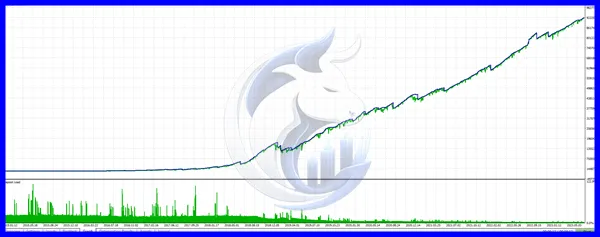
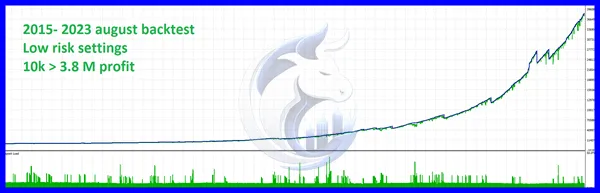
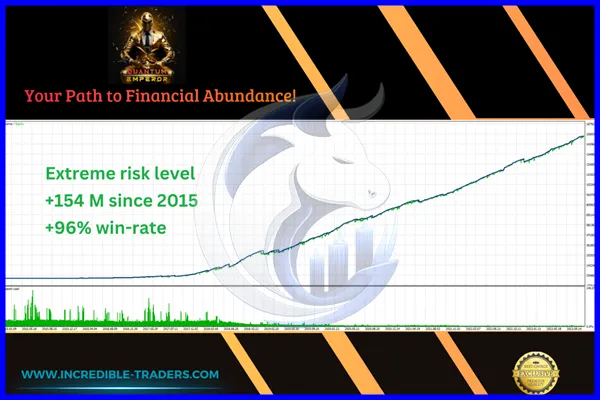
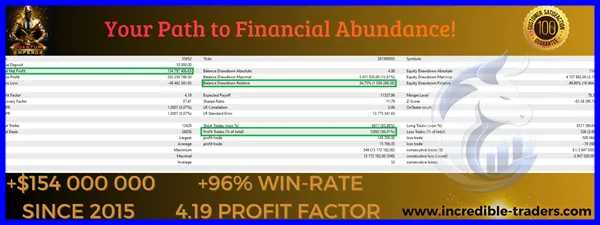
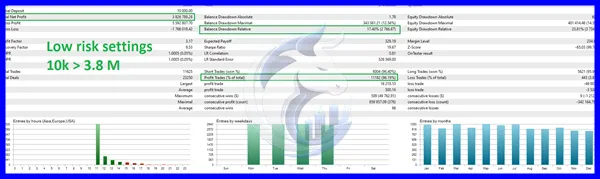
Backtest Results
Conclusion
Quantum Emperor EA V7.5 is a powerful automated Forex Expert Advisor built exclusively for MetaTrader 5 (MT5). By combining intelligent scalping techniques, advanced grid recovery, and customizable risk management, it provides traders with a flexible solution for automated trading across multiple currency pairs.
For optimal performance, use a reliable ECN broker, maintain disciplined risk management, and test the EA on a demo account before deploying it on a live trading account. With its Myfxbook Verified performance and MT5 compatibility, Quantum Emperor EA V7.5 is a solid choice for traders seeking a modern automated trading solution.
For optimal performance, use a reliable ECN broker, maintain disciplined risk management, and test the EA on a demo account before deploying it on a live trading account. With its Myfxbook Verified performance and MT5 compatibility, Quantum Emperor EA V7.5 is a solid choice for traders seeking a modern automated trading solution.
What's Included
File Size
2.1 MB
File Type
ZIP
Downloads
341
Login to add your review.
liamanderson@gmail.com
Jun 30, 2026
One of the smoother automated trading robots I've tested. The default settings worked surprisingly well.
It is an automated Forex Expert Advisor for MetaTrader 5 that combines scalping and grid trading strategies.
It is designed for MetaTrader 4 (MT4).
Yes, it can be used on XAU/USD if properly optimized and supported by your broker.
Yes. A Forex VPS helps maintain continuous operation and reduces latency.
Yes. Beginners can start with the default settings while learning proper risk management.
A minimum deposit of around $300 is generally recommended, although $1,000 or more provides greater flexibility for risk management.
Yes. Once installed and configured, it can automatically open, manage, and close trades based on its strategy.
Yes. It supports multiple Forex pairs, depending on your broker and configuration.
Myfxbook verification provides an additional level of transparency by displaying verified trading performance, helping traders evaluate historical results more confidently.
Yes. Always backtest and run the EA on a demo account before deploying it on a live trading account.