Back to Products
 0.0 (0 reviews)



Featured
Bestseller
Expert Advisors
One Man Army EA v3.3 MT5 + Set Files – Advanced Forex Trading Expert Advisor
$320.00
$16.99
94.69% OFFOne Man Army EA v3.3 MT5 + Set Files is an automated Forex trading Expert Advisor designed for the MetaTrader 5 (MT5) platform. It is built to automate trading decisions and order execution according to its programmed strategy, helping traders reduce manual intervention and maintain consistent trading rules. The included .set files can make setup easier by providing predefined parameter configurations that traders can load into the EA and then optimize according to their broker, account type, risk tolerance, and market conditions.
What is One Man Army EA v3.3 MT5?
One Man Army EA v3.3 MT5 + Set Files is an automated Forex trading Expert Advisor designed for the MetaTrader 5 (MT5) platform. It is built to automate trading decisions and order execution according to its programmed strategy, helping traders reduce manual intervention and maintain consistent trading rules.
The included .set files can make setup easier by providing predefined parameter configurations that traders can load into the EA and then optimize according to their broker, account type, risk tolerance, and market conditions.
The included .set files can make setup easier by providing predefined parameter configurations that traders can load into the EA and then optimize according to their broker, account type, risk tolerance, and market conditions.
Recommended Trading Currency Pairs
One Man Army EA v3.3 MT5 can be evaluated on major and liquid Forex pairs, including:
✅ EUR/USD – High liquidity and generally tighter spreads
✅ GBP/USD – Suitable for traders seeking higher market movement
✅ USD/JPY – Popular major pair with strong liquidity
✅ AUD/USD – Commonly used for automated Forex strategies
✅ USD/CAD – Can be tested as an additional major pair
✅ XAU/USD (Gold) – May be considered only if the EA and supplied set file specifically support Gold
The ideal pair depends on the EA's strategy, broker conditions, spread, execution speed, and the configuration used. Backtesting and forward testing are recommended before selecting a live trading pair.
✅ EUR/USD – High liquidity and generally tighter spreads
✅ GBP/USD – Suitable for traders seeking higher market movement
✅ USD/JPY – Popular major pair with strong liquidity
✅ AUD/USD – Commonly used for automated Forex strategies
✅ USD/CAD – Can be tested as an additional major pair
✅ XAU/USD (Gold) – May be considered only if the EA and supplied set file specifically support Gold
The ideal pair depends on the EA's strategy, broker conditions, spread, execution speed, and the configuration used. Backtesting and forward testing are recommended before selecting a live trading pair.
One Man Army EA v3.3 MT5 Features
Automated Trading - The EA is designed to automate trade execution on MetaTrader 5, allowing traders to operate according to predefined trading parameters.
MT5 Compatibility - One Man Army EA v3.3 is intended for the MetaTrader 5 trading platform, making it suitable for traders using MT5-compatible Forex brokers.
Included Set Files - The accompanying set files can help simplify configuration. Instead of manually entering every parameter, traders can load a suitable preset and make adjustments where necessary.
Adjustable Trading Parameters - Depending on the EA's available inputs, users may be able to customize elements such as lot sizing, risk management, trading conditions, stop-loss parameters, take-profit settings, and other strategy controls.
Strategy Automation - Once properly configured and attached to a compatible MT5 chart, the EA can monitor market conditions and execute trades automatically according to its programmed rules.
Backtesting Support - MT5's built-in Strategy Tester can be used to evaluate the EA against historical market data before considering forward or live deployment.
One Man Army EA v3.3 MT5 – Best Settings
There is no single setting that is universally "best" for every trader because results can vary based on the currency pair, broker, spread, account balance, leverage, market volatility, and risk tolerance.
For beginners, the safest approach is to start with the included set files rather than immediately changing multiple parameters. Load the preset, test it on historical data, and then conduct forward testing on a demo account.
For risk management, consider using a conservative lot size or risk percentage while testing. Avoid increasing lot sizes simply because a backtest shows strong historical performance.
A practical workflow is:
Set file → Backtest → Optimize carefully → Demo forward test → Small live test → Monitor performance
Avoid excessive optimization because curve-fitting historical data can produce settings that perform poorly in future market conditions.
For beginners, the safest approach is to start with the included set files rather than immediately changing multiple parameters. Load the preset, test it on historical data, and then conduct forward testing on a demo account.
For risk management, consider using a conservative lot size or risk percentage while testing. Avoid increasing lot sizes simply because a backtest shows strong historical performance.
A practical workflow is:
Set file → Backtest → Optimize carefully → Demo forward test → Small live test → Monitor performance
Avoid excessive optimization because curve-fitting historical data can produce settings that perform poorly in future market conditions.
Instructions for Installing One Man Army EA v3.3 MT5
Follow these steps to install One Man Army EA v3.3 MT5:
Step 01) Download the One Man Army EA v3.3 MT5 files and extract the ZIP/RAR archive if necessary.
Step 02) Open MetaTrader 5.
Step 03) Click File → Open Data Folder.
Step 04) Navigate to MQL5 → Experts.
Step 05) Copy the EA .ex5 file into the Experts folder.
Step 06) If additional indicators or supporting files are included, place them in their corresponding MT5 folders.
Step 07) Restart MetaTrader 5 or refresh the Navigator panel.
Step 08) Locate One Man Army EA v3.3 under Expert Advisors.
Step 09) Open the recommended currency-pair chart and timeframe.
Step 10) Drag the EA onto the chart.
Step 11) Enable Algo Trading in MT5.
Step 12) Open the EA's Inputs section and load the supplied .set file if available.
Step 13) Confirm the trading parameters and risk settings.
Step 14) Start with a demo account and monitor the EA before considering live trading.
Step 01) Download the One Man Army EA v3.3 MT5 files and extract the ZIP/RAR archive if necessary.
Step 02) Open MetaTrader 5.
Step 03) Click File → Open Data Folder.
Step 04) Navigate to MQL5 → Experts.
Step 05) Copy the EA .ex5 file into the Experts folder.
Step 06) If additional indicators or supporting files are included, place them in their corresponding MT5 folders.
Step 07) Restart MetaTrader 5 or refresh the Navigator panel.
Step 08) Locate One Man Army EA v3.3 under Expert Advisors.
Step 09) Open the recommended currency-pair chart and timeframe.
Step 10) Drag the EA onto the chart.
Step 11) Enable Algo Trading in MT5.
Step 12) Open the EA's Inputs section and load the supplied .set file if available.
Step 13) Confirm the trading parameters and risk settings.
Step 14) Start with a demo account and monitor the EA before considering live trading.
Who Should Use One Man Army EA v3.3 MT5?
This MT5 Expert Advisor may be suitable for:
✅ Forex traders interested in automated trading
✅ MT5 users who want to reduce manual trade execution
✅ Beginners learning about Expert Advisors and algorithmic trading
✅ Experienced traders who want to test an automated strategy
✅ Traders who want to experiment with predefined .set configurations
✅ Users interested in backtesting and optimizing automated strategies
It may not be appropriate for traders who expect guaranteed returns or who are unwilling to monitor automated trading systems.
✅ Forex traders interested in automated trading
✅ MT5 users who want to reduce manual trade execution
✅ Beginners learning about Expert Advisors and algorithmic trading
✅ Experienced traders who want to test an automated strategy
✅ Traders who want to experiment with predefined .set configurations
✅ Users interested in backtesting and optimizing automated strategies
It may not be appropriate for traders who expect guaranteed returns or who are unwilling to monitor automated trading systems.
Download One Man Army EA v3.3 MT5
Download One Man Army EA v3.3 MT5Pros and Cons
Pros
Automates trade execution
Designed for MetaTrader 5
Includes useful set files for easier configuration
Reduces the need for constant manual order placement
Can be tested using the MT5 Strategy Tester
Parameters can potentially be adjusted to suit different trading approaches
Suitable for demo testing and strategy evaluation
Cons
No EA can guarantee consistent profits
Performance can vary between brokers
Spread and slippage may affect results
Historical backtests do not guarantee future performance
Poor risk management can increase losses
Requires correct installation and configuration
Some strategies may perform differently during changing market conditions
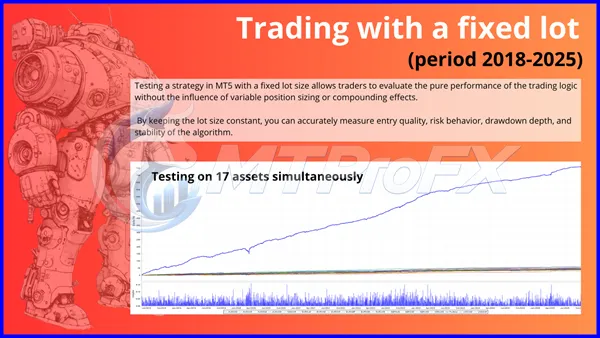
Backtest Results
Final Verdict – Is One Man Army EA v3.3 MT5 Worth It?
One Man Army EA v3.3 MT5 + Set Files provides an automated approach to Forex trading for users working with the MetaTrader 5 platform. Its combination of EA automation and preset configuration files can make the initial setup more convenient while giving traders an opportunity to test and customize the system.
For the best results, focus on proper risk management, realistic backtesting, forward testing, broker compatibility, and conservative deployment rather than relying solely on historical performance.
For the best results, focus on proper risk management, realistic backtesting, forward testing, broker compatibility, and conservative deployment rather than relying solely on historical performance.
What's Included
File Size
104 KB
File Type
ZIP
Downloads
132
Login to add your review.
roberts32@gmail.com
Sep 07, 2026
I like the fact that I can test different configurations in MT5 Strategy Tester before using the EA with real money.
One Man Army EA v3.3 MT5 is an automated trading Expert Advisor designed to operate on the MetaTrader 5 platform according to its programmed trading strategy.
The product specified here is the MT5 version. It should not be assumed to work on MT4 unless a separate MT4 version is provided.
Set files are preset configuration files containing EA input parameters. They can help users configure the Expert Advisor without manually entering every available setting.
Liquid major pairs such as EUR/USD, GBP/USD, USD/JPY, AUD/USD, and USD/CAD are reasonable candidates for testing. The best pair should ultimately be determined through backtesting and forward testing.
The correct timeframe depends on the EA's programmed strategy and supplied configuration. Use the timeframe recommended with the specific set file, and verify its performance through MT5 backtesting and demo forward testing.
Technically, an MT5 EA can be deployed on a compatible live trading account, but it is strongly recommended to test it on a demo account first and use conservative risk settings.
No. Forex trading involves substantial risk, and automated trading systems cannot guarantee profits. Past backtest performance is not a guarantee of future results.
For a standard locally hosted MT5 Expert Advisor to continue monitoring and trading, the MT5 terminal generally needs to remain running and connected to the broker. A VPS can be used for continuous operation.