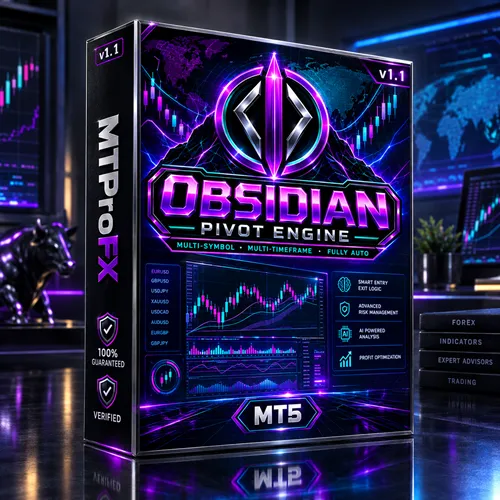
Obsidian Pivot Engine EA MT5 v1.1 – Powerful Pivot Breakout Trading EA
$16.99
93.64% OFF☑️ Obsidian Pivot Engine EA MT5 v1.1 is a MetaTrader 5 Expert Advisor built around pivot-level breakout trading and multi-timeframe market analysis. The EA primarily targets XAUUSD on the M15 timeframe, while also supporting BTCUSD and NASDAQ as optional markets. It uses pending-order breakout entries and includes risk-management features such as initial stop loss, exposure limits, position controls, and automatic pending-order management. The published product information states that the EA does not use martingale, grid trading, or averaging techniques.
What is Obsidian Pivot Engine EA MT5 v1.1?
The published product information states that the EA does not use martingale, grid trading, or averaging techniques.
Recommended Trading Currency Pairs
☑️ XAUUSD – Gold
XAUUSD M15 is the primary configuration associated with the published backtest and product documentation. The EA is designed to identify important price levels and trade confirmed breakouts around those levels.
☑️ BTCUSD – Bitcoin
BTCUSD can be enabled as an additional market. Because cryptocurrency markets can behave differently from traditional markets, traders should independently test the configuration before using it.
☑️ NASDAQ
NASDAQ is also supported as an optional symbol and can be configured independently from the other supported markets.
Primary setup: XAUUSD → M15
Additional markets: BTCUSD → NASDAQ
Obsidian Pivot Engine EA MT5 v1.1 Features
Obsidian Pivot Engine EA MT5 v1.1 – Best Settings
☑️ Platform: MetaTrader 5
☑️ Primary Symbol: XAUUSD
☑️ Primary Timeframe: M15
☑️ Trading Method: Pivot/level breakout
☑️ Additional Symbols: BTCUSD and NASDAQ
☑️ Lot Mode: Automatic risk-based sizing or manually configured volume
☑️ Account Type: Hedging is recommended when operating multiple symbols independently
☑️ VPS: Recommended for continuous automated operation
☑️ Initial Testing: Start with the EA's default configuration and validate it in the MT5 Strategy Tester before changing risk parameters.
A published backtest used XAUUSD M15 with a 0.01 fixed lot, but this should be treated as a historical test configuration rather than a guarantee or universal live-trading setting.
For safer evaluation, test different market conditions, spreads, trading sessions, and drawdown behavior rather than relying only on a single backtest.
Instructions for Installing Obsidian Pivot Engine EA MT5 v1.1
Install and log in to your MetaTrader 5 trading terminal.
☑️ Step 2 – Open the MT5 Data Folder
Inside MT5, select:
File → Open Data Folder
Then navigate to:
MQL5 → Experts
☑️ Step 3 – Copy the EA
Place the Obsidian Pivot Engine .ex5 file inside the Experts folder.
☑️ Step 4 – Restart MetaTrader 5
Restart MT5 or refresh the Expert Advisors section in the Navigator.
☑️ Step 5 – Open the Trading Chart
For the primary configuration, open:
XAUUSD → M15
☑️ Step 6 – Attach the EA
Find Obsidian Pivot Engine in the Navigator and drag it onto the selected chart.
☑️ Step 7 – Enable Automated Trading
Make sure the Algo Trading function is enabled.
☑️ Step 8 – Configure Parameters
Review the risk, lot-size, position-limit, symbol and pending-order settings.
☑️ Step 9 – Test Before Live Use
Run the EA through the MT5 Strategy Tester and preferably a demo environment before considering live deployment.
A third-party listing also specifies enabling automated trading and the Expert Advisors settings before attaching the EA.
Who Should Use Obsidian Pivot Engine EA MT5 v1.1?
☑️ A MetaTrader 5 Expert Advisor
☑️ Pivot or level-based breakout trading
☑️ XAUUSD M15 automation
☑️ Multi-timeframe analysis
☑️ Optional BTCUSD and NASDAQ trading
☑️ An EA without martingale or grid techniques
☑️ Automated pending-order management
☑️ Built-in risk and exposure controls
☑️ Strategy Tester compatibility
It is particularly important for users to understand the EA's breakout methodology and risk characteristics before relying on automated trading.
Download Obsidian Pivot Engine EA MT5 v1.1
Download Obsidian Pivot Engine EA MT5 v1.1Pros and Cons
Pros
Cons
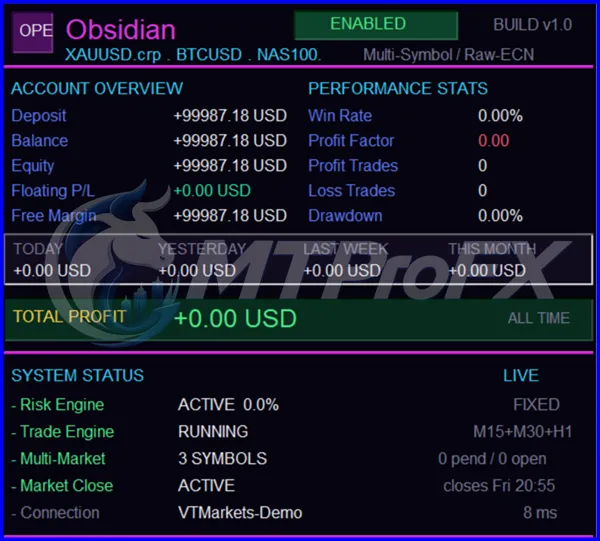
Backtest Results


Get Obsidian Pivot Engine EA MT5 v1.1 FREE (VIP Members Only)
Join a VIP Telegram group to get access. Pick your plan:
Final Verdict – Is Obsidian Pivot Engine EA MT5 v1.1 Worth It?
Its published feature set includes no martingale, no grid, no averaging, automatic risk-based sizing, stop-loss protection, pending-order management and aggregate exposure controls.
For anyone evaluating this EA, the most important step is to test its performance under different market conditions using MT5's Strategy Tester and a demo environment. Historical backtest results should never be treated as a promise of future trading performance.
What's Included
Login to add your review.
I was looking for an MT5 EA based on breakout levels rather than grid trading. Obsidian Pivot Engine has the features I was looking for and is easy to configure.