Back to Products
 0.0 (0 reviews)



Featured
Bestseller
Expert Advisors
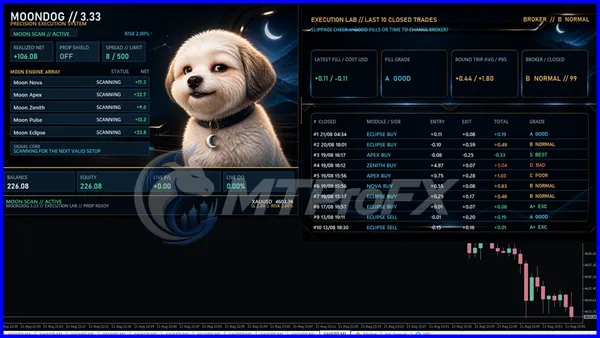
MoonDog EA MT5 v3.38: Advanced XAUUSD Breakout Trading Robot for Gold
$230.00
$16.99
92.61% OFFMoonDog EA MT5 v3.38 is an automated XAUUSD breakout Expert Advisor for MetaTrader 5 featuring multiple independent strategies, pending-order execution, Stop Loss and Take Profit management, break-even, trailing stop and MoonLock profit protection. It is designed for systematic gold trading without martingale-style recovery methods.
What is MoonDog EA MT5 v3.38?
MoonDog EA MT5 v3.38 is a MetaTrader 5 Expert Advisor designed primarily for automated XAUUSD (Gold) trading. The available product descriptions present it as a multi-strategy breakout system using several independent trading modules, pending Buy Stop and Sell Stop orders, predefined Stop Loss and Take Profit levels, and automated position-management features.
The EA is designed to automate trade execution so traders can test a structured breakout methodology without manually watching every market movement. However, automated trading still involves substantial market and execution risk, and historical or backtested performance should not be treated as a guarantee of future results.
The EA is designed to automate trade execution so traders can test a structured breakout methodology without manually watching every market movement. However, automated trading still involves substantial market and execution risk, and historical or backtested performance should not be treated as a guarantee of future results.
Recommended Trading Currency Pairs
☑️ XAUUSD – Gold
The primary market associated with MoonDog EA MT5 v3.38 is XAUUSD, making it particularly focused on automated gold trading.
XAUUSD can experience rapid price movements, changing spreads and significant volatility around major economic announcements. Because of this, traders should test the EA using their own broker's XAUUSD specifications before considering any live deployment.
The publicly available descriptions do not establish v3.38 as a multi-currency-pair EA, so it is better to describe XAUUSD as the main recommended instrument rather than claim broad forex-pair compatibility.
The primary market associated with MoonDog EA MT5 v3.38 is XAUUSD, making it particularly focused on automated gold trading.
XAUUSD can experience rapid price movements, changing spreads and significant volatility around major economic announcements. Because of this, traders should test the EA using their own broker's XAUUSD specifications before considering any live deployment.
The publicly available descriptions do not establish v3.38 as a multi-currency-pair EA, so it is better to describe XAUUSD as the main recommended instrument rather than claim broad forex-pair compatibility.
MoonDog EA MT5 v3.38 Features
Five Independent Breakout Strategies - MoonDog is described as using five independent breakout modules, allowing different market conditions to be evaluated rather than relying on one single entry approach.
Automated Pending Orders - The EA can use Buy Stop and Sell Stop pending orders to participate in potential breakout movements automatically.
Stop Loss and Take Profit - Each trade can be managed with its own predefined Stop Loss and Take Profit, helping establish trade-level risk and exit parameters.
Break-Even Management - The available feature descriptions include automated break-even management to adjust protection after a trade develops.
Trailing Stop - Trailing-stop functionality can help manage an open position as price moves in the intended direction.
MoonLock Profit Protection - MoonLock is described as a progressive profit-protection mechanism designed to help protect gains as a position develops.
Fake-Breakout Protection - The EA is also described as including protection intended to filter potential false breakout conditions.
Optional News Filter - An optional economic-news filter is included in the described feature set, allowing traders to configure how the system behaves around important economic events.
Fixed-Lot and Percentage-Based Risk - MoonDog descriptions mention both fixed-lot and percentage-based money-management options. Because multiple strategy modules can potentially operate independently, total exposure should be considered rather than looking only at the risk assigned to one trade.
No Martingale or Recovery Strategy - Available descriptions specifically state that the system does not rely on martingale, grid recovery, loss averaging or progressive lot multiplication.
MoonDog EA MT5 v3.38 – Best Settings
For a new installation, it is sensible to begin conservatively rather than immediately increasing position size.
☑️ Platform: MetaTrader 5
☑️ Primary symbol: XAUUSD
☑️ Trading approach: Breakout
☑️ Risk: Start with a conservative fixed lot or low percentage risk
☑️ Strategy modules: Use the supplied/recommended configuration initially
☑️ News filter: Consider enabling it during initial testing
☑️ Stop Loss: Keep the EA's defined protection active
☑️ Profit management: Break-even, trailing and MoonLock can be evaluated during testing
☑️ Execution: Prefer a broker with stable XAUUSD execution and competitive spreads
☑️ Testing: Use MT5 Strategy Tester with realistic trading costs
☑️ Environment: A stable VPS can be useful for continuously running automated software
There is no universally “best” setting for every account. Broker spreads, execution, account size, leverage, contract specifications and market conditions can materially change results.
☑️ Platform: MetaTrader 5
☑️ Primary symbol: XAUUSD
☑️ Trading approach: Breakout
☑️ Risk: Start with a conservative fixed lot or low percentage risk
☑️ Strategy modules: Use the supplied/recommended configuration initially
☑️ News filter: Consider enabling it during initial testing
☑️ Stop Loss: Keep the EA's defined protection active
☑️ Profit management: Break-even, trailing and MoonLock can be evaluated during testing
☑️ Execution: Prefer a broker with stable XAUUSD execution and competitive spreads
☑️ Testing: Use MT5 Strategy Tester with realistic trading costs
☑️ Environment: A stable VPS can be useful for continuously running automated software
There is no universally “best” setting for every account. Broker spreads, execution, account size, leverage, contract specifications and market conditions can materially change results.
Instructions for Installing MoonDog EA MT5 v3.38
☑️ Step 1: Open MetaTrader 5
Launch your MetaTrader 5 desktop terminal and make sure you are logged into the intended trading account.
☑️ Step 2: Open the Data Folder
From MT5, open:
File → Open Data Folder
Then navigate to:
MQL5 → Experts
☑️ Step 3: Copy the EA
Place the legitimate MoonDog EA v3.38 .ex5 file into the Experts folder.
☑️ Step 4: Restart or Refresh MT5
Restart MetaTrader 5 or refresh the Navigator window so the Expert Advisor appears under:
Navigator → Expert Advisors
☑️ Step 5: Open an XAUUSD Chart
Open an XAUUSD chart supported by your broker.
☑️ Step 6: Attach MoonDog EA
Drag the EA onto the chart and review its available parameters.
☑️ Step 7: Configure Risk
Select conservative money-management settings appropriate for testing. Do not assume settings designed for another broker or account will behave identically on yours.
☑️ Step 8: Enable Automated Trading
If appropriate for your test environment, enable the MT5 Algo Trading function and confirm that the EA is operating correctly.
☑️ Step 9: Demo Test
Run the EA on a demo account first. Check entries, pending orders, Stop Loss, Take Profit, spread behaviour and position management before considering any real-money use.
Launch your MetaTrader 5 desktop terminal and make sure you are logged into the intended trading account.
☑️ Step 2: Open the Data Folder
From MT5, open:
File → Open Data Folder
Then navigate to:
MQL5 → Experts
☑️ Step 3: Copy the EA
Place the legitimate MoonDog EA v3.38 .ex5 file into the Experts folder.
☑️ Step 4: Restart or Refresh MT5
Restart MetaTrader 5 or refresh the Navigator window so the Expert Advisor appears under:
Navigator → Expert Advisors
☑️ Step 5: Open an XAUUSD Chart
Open an XAUUSD chart supported by your broker.
☑️ Step 6: Attach MoonDog EA
Drag the EA onto the chart and review its available parameters.
☑️ Step 7: Configure Risk
Select conservative money-management settings appropriate for testing. Do not assume settings designed for another broker or account will behave identically on yours.
☑️ Step 8: Enable Automated Trading
If appropriate for your test environment, enable the MT5 Algo Trading function and confirm that the EA is operating correctly.
☑️ Step 9: Demo Test
Run the EA on a demo account first. Check entries, pending orders, Stop Loss, Take Profit, spread behaviour and position management before considering any real-money use.
Who Should Use MoonDog EA MT5 v3.38?
MoonDog EA MT5 v3.38 may be of interest to traders who:
☑️ Want to study automated XAUUSD breakout trading.
☑️ Prefer systematic execution rather than manually entering every breakout.
☑️ Use MetaTrader 5.
☑️ Understand the risks of leveraged markets.
☑️ Are willing to backtest and demo-test an Expert Advisor.
☑️ Prefer defined trade-management rules.
☑️ Want to evaluate a system without martingale-style recovery methods.
It may be less suitable for someone looking for a guaranteed-profit system, a completely hands-off investment solution, or an EA that automatically eliminates trading risk.
☑️ Want to study automated XAUUSD breakout trading.
☑️ Prefer systematic execution rather than manually entering every breakout.
☑️ Use MetaTrader 5.
☑️ Understand the risks of leveraged markets.
☑️ Are willing to backtest and demo-test an Expert Advisor.
☑️ Prefer defined trade-management rules.
☑️ Want to evaluate a system without martingale-style recovery methods.
It may be less suitable for someone looking for a guaranteed-profit system, a completely hands-off investment solution, or an EA that automatically eliminates trading risk.
Download MoonDog EA MT5 v3.38
Download MoonDog EA MT5 v3.38Pros and Cons
Pros
Designed specifically around XAUUSD.
Uses multiple breakout strategy modules.
Automated Buy Stop and Sell Stop functionality.
Stop Loss and Take Profit management.
Break-even and trailing functionality.
MoonLock profit-protection feature.
Optional economic-news filtering.
Fixed-lot and percentage-based money-management options.
Public descriptions state that it avoids martingale and recovery trading.
Cons
Gold can be highly volatile.
Multiple modules can increase overall exposure.
Broker spreads and execution can affect results.
Backtest results cannot guarantee future performance.
Different brokers may have different XAUUSD contract specifications.
The EA requires careful configuration and testing.
Automated trading does not remove the possibility of significant losses.
Backtest Results
Get MoonDog EA MT5 v3.38 FREE (VIP Members Only)
Join a VIP Telegram group to get access. Pick your plan:
Final Verdict – Is MoonDog EA MT5 v3.38 Worth It?
MoonDog EA MT5 v3.38 is positioned as a specialized automated XAUUSD breakout EA for MetaTrader 5, combining multiple independent strategies with automated pending orders and several trade-management functions. Its described avoidance of martingale and recovery methods may appeal to traders looking for a more structured approach to automated gold trading.
The most important consideration is not simply the feature list. Gold trading can be volatile, and automated systems remain sensitive to spreads, slippage, execution quality, market conditions and account risk. Thorough Strategy Tester analysis and demo testing should come before any consideration of live trading.
The most important consideration is not simply the feature list. Gold trading can be volatile, and automated systems remain sensitive to spreads, slippage, execution quality, market conditions and account risk. Thorough Strategy Tester analysis and demo testing should come before any consideration of live trading.
What's Included
File Size
269 KB
File Type
ZIP
Downloads
134
Login to add your review.
juliusricha23@gmail.com
Sep 13, 2026
MoonDog has an interesting breakout approach for XAUUSD. I particularly like the combination of automated entries and built-in trade-management features. I would still recommend thorough demo testing before live use.
MoonDog EA MT5 v3.38 is an Expert Advisor for MetaTrader 5 primarily designed for automated XAUUSD breakout trading.
XAUUSD (Gold) is the primary instrument associated with the v3.38 version in the available product descriptions.
The available descriptions state that MoonDog does not use martingale, grid recovery, loss averaging or loss-based lot multiplication.
Yes. MoonDog EA v3.38 is described as an MT5 Expert Advisor and uses the .ex5 format.
No. No Expert Advisor can guarantee future trading profits. Market volatility, spreads, slippage, liquidity and execution conditions can all affect results.
Yes. The available descriptions indicate that MoonDog can be evaluated using the MetaTrader 5 Strategy Tester, with realistic tick data and trading costs recommended for more meaningful testing.
A stable VPS can be useful when running an automated MT5 Expert Advisor continuously, particularly when uninterrupted terminal connectivity is important.
No. A prudent approach is to test the EA first using historical data and then on a demo account with the same broker conditions you expect to use. Only consider live deployment after understanding its behaviour and risks.