Back to Products
 0.0 (0 reviews)


Featured
Bestseller
Expert Advisors
Iron Stops EA MT5 v1.18 – Automated Trading Expert Advisor
$350.00
$16.99
95.15% OFFIron Stops EA MT5 v1.18 is an automated Forex Expert Advisor (EA) designed for the MetaTrader 5 (MT5) platform. The tool focuses on systematic stop-based trade management and automated market execution, helping traders reduce manual intervention and maintain consistent trading rules. It can be used to automate entries, stop-loss management, take-profit levels, and other trading parameters according to the EA's configuration. As with any automated trading system, results can vary depending on the currency pair, broker conditions, spread, timeframe, and market environment.
What is Iron Stops EA MT5 v1.18?
Iron Stops EA MT5 v1.18 is an automated Forex Expert Advisor (EA) designed for the MetaTrader 5 (MT5) platform. The tool focuses on systematic stop-based trade management and automated market execution, helping traders reduce manual intervention and maintain consistent trading rules.
It can be used to automate entries, stop-loss management, take-profit levels, and other trading parameters according to the EA's configuration. As with any automated trading system, results can vary depending on the currency pair, broker conditions, spread, timeframe, and market environment.
It can be used to automate entries, stop-loss management, take-profit levels, and other trading parameters according to the EA's configuration. As with any automated trading system, results can vary depending on the currency pair, broker conditions, spread, timeframe, and market environment.
Recommended Trading Currency Pairs
Iron Stops EA MT5 v1.18 can be considered for major and highly liquid Forex pairs where spreads and execution conditions are generally favorable.
Recommended pairs include:
✅EUR/USD – Suitable for testing because of its high liquidity and typically tight spreads.
✅GBP/USD – Can provide stronger price movements, although volatility is higher.
✅USD/JPY – A popular pair for automated systems because of its liquidity.
✅USD/CHF – Worth testing as an additional major-pair option.
✅AUD/USD – Can be considered for diversification.
✅EUR/GBP – May be useful when testing the EA across different volatility characteristics.
Before using the EA on a live account, traders should backtest each pair with their intended broker and verify that the strategy performs acceptably under current spread and execution conditions.
Recommended pairs include:
✅EUR/USD – Suitable for testing because of its high liquidity and typically tight spreads.
✅GBP/USD – Can provide stronger price movements, although volatility is higher.
✅USD/JPY – A popular pair for automated systems because of its liquidity.
✅USD/CHF – Worth testing as an additional major-pair option.
✅AUD/USD – Can be considered for diversification.
✅EUR/GBP – May be useful when testing the EA across different volatility characteristics.
Before using the EA on a live account, traders should backtest each pair with their intended broker and verify that the strategy performs acceptably under current spread and execution conditions.
Iron Stops EA MT5 v1.18 Features
Fully Automated Trading – Designed to execute trading operations automatically.
Stop-Based Trading Approach – Uses stop-related trading logic as part of its strategy.
Adjustable Parameters – Traders can configure available EA inputs according to their risk preferences.
MT5 Compatibility – Developed for the MetaTrader 5 trading environment.
Systematic Execution – Helps remove emotional decisions from the trading process.
24/5 Operation – Can continue monitoring the market while the MT5 terminal and VPS remain active.
Backtesting Support – Traders can evaluate historical performance using the MT5 Strategy Tester.
Risk Configuration – Available risk and lot-management settings can be adjusted according to the EA's input parameters.
Timeframe Flexibility – The appropriate timeframe can be selected and optimized through historical testing.
Iron Stops EA MT5 v1.18 – Best Settings
There is no single configuration that is guaranteed to be the best setting for Iron Stops EA MT5 v1.18. The optimal parameters depend on the currency pair, broker, account size, risk tolerance, and market conditions.
For a safer starting approach, traders should:
✅ Start with low-risk parameters rather than aggressive lot sizing.
✅ Test the EA on EUR/USD and other major pairs first.
✅ Use the MT5 Strategy Tester before deploying it on a live account.
✅ Test different timeframes instead of assuming one timeframe is universally optimal.
✅ Keep maximum drawdown under close observation.
✅ Avoid excessive lot multipliers or aggressive recovery settings.
✅ Run a demo-forward test after completing historical backtesting.
✅ Use a reliable VPS if continuous automated execution is required.
✅ Re-optimize only when there is sufficient historical data and a logical reason to do so.
✅ Never select settings solely because they produced the highest historical profit.
A practical approach is to prioritize stable drawdown, consistency, and risk-adjusted returns rather than maximum backtest profit.
For a safer starting approach, traders should:
✅ Start with low-risk parameters rather than aggressive lot sizing.
✅ Test the EA on EUR/USD and other major pairs first.
✅ Use the MT5 Strategy Tester before deploying it on a live account.
✅ Test different timeframes instead of assuming one timeframe is universally optimal.
✅ Keep maximum drawdown under close observation.
✅ Avoid excessive lot multipliers or aggressive recovery settings.
✅ Run a demo-forward test after completing historical backtesting.
✅ Use a reliable VPS if continuous automated execution is required.
✅ Re-optimize only when there is sufficient historical data and a logical reason to do so.
✅ Never select settings solely because they produced the highest historical profit.
A practical approach is to prioritize stable drawdown, consistency, and risk-adjusted returns rather than maximum backtest profit.
Instructions for Installing Iron Stops EA MT5 v1.18
Installing Iron Stops EA MT5 v1.18 is straightforward when the EA file is supplied in standard MetaTrader 5 format.
✅ Step 1: Open MetaTrader 5
Launch your MetaTrader 5 trading platform.
✅ Step 2: Open the Data Folder
Go to:
File → Open Data Folder
Then navigate to:
MQL5 → Experts
✅ Step 3: Copy the EA
Copy the Iron Stops EA MT5 v1.18 .ex5 file into the Experts folder.
✅ Step 4: Restart MT5
Close and reopen MetaTrader 5, or right-click the Navigator window and select Refresh.
✅ Step 5: Find the EA
Open:
Navigator → Expert Advisors
Locate Iron Stops EA MT5 v1.18.
✅ Step 6: Attach the EA
Drag the EA onto your preferred MT5 chart.
✅ Step 7: Configure Inputs
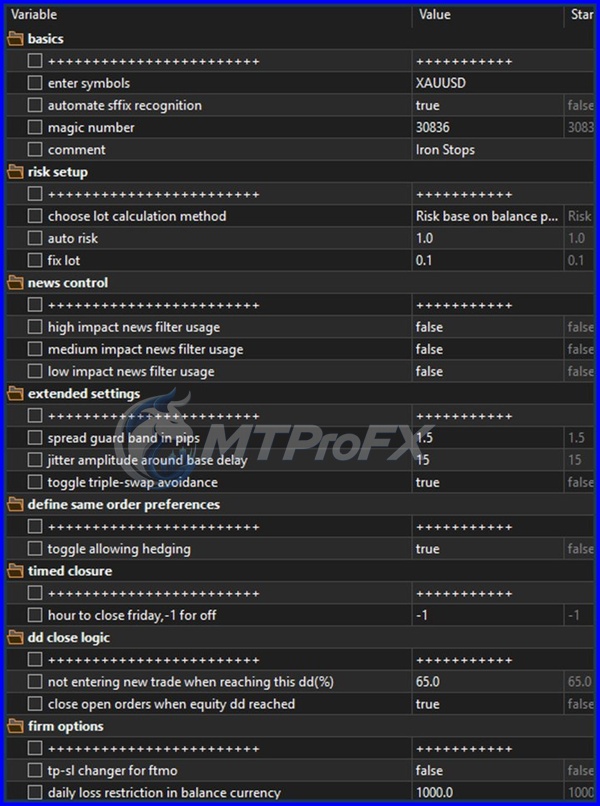
Review the available parameters carefully and configure risk, lot size, trading conditions, and other available settings.
✅ Step 8: Enable Automated Trading
Make sure the Algo Trading button is enabled.
✅ Step 9: Test Before Going Live
Run a historical backtest and then forward-test the EA on a demo account before considering live deployment.
✅ Step 1: Open MetaTrader 5
Launch your MetaTrader 5 trading platform.
✅ Step 2: Open the Data Folder
Go to:
File → Open Data Folder
Then navigate to:
MQL5 → Experts
✅ Step 3: Copy the EA
Copy the Iron Stops EA MT5 v1.18 .ex5 file into the Experts folder.
✅ Step 4: Restart MT5
Close and reopen MetaTrader 5, or right-click the Navigator window and select Refresh.
✅ Step 5: Find the EA
Open:
Navigator → Expert Advisors
Locate Iron Stops EA MT5 v1.18.
✅ Step 6: Attach the EA
Drag the EA onto your preferred MT5 chart.
✅ Step 7: Configure Inputs
Review the available parameters carefully and configure risk, lot size, trading conditions, and other available settings.
✅ Step 8: Enable Automated Trading
Make sure the Algo Trading button is enabled.
✅ Step 9: Test Before Going Live
Run a historical backtest and then forward-test the EA on a demo account before considering live deployment.
Who Should Use Iron Stops EA MT5 v1.18?
Iron Stops EA MT5 v1.18 may be suitable for:
✅ Forex traders interested in automated trading.
✅ MT5 users who want to reduce manual trade execution.
✅ Traders who understand EA configuration and backtesting.
✅ Traders interested in systematic stop-based trading strategies.
✅ Experienced traders who want to experiment with automated strategies.
✅ Users who can monitor automated systems and manage trading risk.
It may not be suitable for beginners who expect guaranteed profits or who do not understand drawdown, leverage, margin, and automated-trading risks.
✅ Forex traders interested in automated trading.
✅ MT5 users who want to reduce manual trade execution.
✅ Traders who understand EA configuration and backtesting.
✅ Traders interested in systematic stop-based trading strategies.
✅ Experienced traders who want to experiment with automated strategies.
✅ Users who can monitor automated systems and manage trading risk.
It may not be suitable for beginners who expect guaranteed profits or who do not understand drawdown, leverage, margin, and automated-trading risks.
Download Iron Stops EA MT5 v1.18
Download Iron Stops EA MT5 v1.18Pros and Cons
Pros
Automated trading through MT5
Reduces emotional trading decisions
Can operate continuously while MT5 is running
Configurable EA parameters
Suitable for historical backtesting
Can be tested across multiple currency pairs
Provides a systematic approach to trade execution
Cons
No EA can guarantee profits
Results can vary between brokers
Backtest performance may not match live results
Slippage and spread can affect profitability
Requires proper risk management
Incorrect optimization can lead to overfitting
VPS and stable internet may be required for continuous operation
Backtest Results
Final Verdict – Is Iron Stops EA MT5 v1.18 Worth It?
Iron Stops EA MT5 v1.18 provides an automated approach to Forex trading on the MetaTrader 5 platform. Its main appeal is the ability to execute a predefined trading methodology without requiring constant manual intervention.
For the best evaluation, traders should test the EA across several liquid currency pairs, experiment carefully with timeframes and risk parameters, and compare results using realistic spreads, commissions, and slippage. Backtesting, demo-forward testing, and disciplined risk management should come before live deployment.
Ultimately, the goal should not be to find the setting with the largest historical profit, but to identify a configuration with reasonable drawdown, consistent behavior, and risk that matches your trading capital.
For the best evaluation, traders should test the EA across several liquid currency pairs, experiment carefully with timeframes and risk parameters, and compare results using realistic spreads, commissions, and slippage. Backtesting, demo-forward testing, and disciplined risk management should come before live deployment.
Ultimately, the goal should not be to find the setting with the largest historical profit, but to identify a configuration with reasonable drawdown, consistent behavior, and risk that matches your trading capital.
What's Included
File Size
320 KB
File Type
ZIP
Downloads
168
Login to add your review.
williyamjasson@gmail.com
Sep 01, 2026
I like the systematic nature of the EA. My demo testing has been useful for understanding how it behaves under different market conditions.
Iron Stops EA MT5 v1.18 is an automated trading Expert Advisor designed to run on the MetaTrader 5 platform and automate trading according to its programmed strategy and configured parameters.
Profitability cannot be guaranteed. Actual results depend on market conditions, settings, broker execution, spreads, commissions, slippage, and risk management.
Major liquid pairs such as EUR/USD, GBP/USD, USD/JPY, USD/CHF, and AUD/USD are reasonable starting points for testing.
There is no universally best timeframe. Traders should backtest multiple timeframes and select configurations that demonstrate stable performance rather than simply choosing the highest-profit result.
Yes. An MT5 Expert Advisor can be evaluated using the Strategy Tester, provided the EA is compatible with the testing environment and its required settings/data are available.
Technically, an EA can be used on a live MT5 account if it is compatible with the broker and account. However, extensive backtesting and demo-forward testing are strongly recommended first.
No. No automated trading system can guarantee future profits. Historical performance does not guarantee future results.
A VPS can be useful if you want the EA to operate continuously without depending on your personal computer remaining switched on and connected to the internet.
The required capital depends on the broker's minimum lot size, margin requirements, EA configuration, and your desired risk level. Avoid selecting account size solely from historical backtest profits.
Beginners can learn to use an EA, but they should first understand leverage, margin, drawdown, stop-losses, lot sizing, and automated-trading risks before using real money.