
Gold Trade Pro EA MT5 v6.70 – Powerful XAUUSD Automated Forex Trading EA
$16.99
96.6% OFFGold Trade Pro EA MT5 v6.70 is an automated Expert Advisor designed for the MetaTrader 5 (MT5) platform, with a strong focus on trading gold and potentially other suitable forex instruments. It is intended to automate trading decisions, entry and exit management, and risk-control processes according to its programmed strategy. The EA can be useful for traders who want to reduce manual trading and monitor the market through an automated trading system. As with any forex robot, performance can vary depending on the broker, spread, leverage, market conditions, and configuration.
What is Gold Trade Pro EA MT5 v6.70?
Instead of manually analyzing every potential trade, an EA can monitor price movements and execute trades automatically when its programmed conditions are met.
Important: The exact strategy, supported symbols, and parameter behavior depend on the EA's supplied settings and documentation. Always test the EA on a demo account before using real funds.
Recommended Trading Currency Pairs
XAUUSD is the primary instrument to consider when using a gold-focused EA. Gold can provide significant price movements and liquidity, but it can also experience sharp volatility around major economic announcements.
Other Forex Pairs
If the EA documentation confirms support for additional symbols, traders can test instruments such as:
✅ EURUSD
✅ GBPUSD
✅ USDJPY
✅ AUDUSD
✅ USDCAD
Do not assume that every pair is suitable simply because MT5 allows it. The best symbol depends on the EA's strategy, broker conditions, and backtesting results.
Gold Trade Pro EA MT5 v6.70 Features
Gold Trade Pro EA MT5 v6.70 – Best Settings
For a safer starting approach, consider using XAUUSD on MT5, selecting a conservative risk level, and avoiding aggressive lot multipliers until sufficient testing has been completed.
A practical setup process is:
Start with the EA's recommended default parameters.
Use a demo account for initial testing.
Keep risk per trade conservative.
Test the EA over different market conditions.
Compare fixed-lot and risk-based configurations if the EA supports both.
Check the broker's XAUUSD spread and trading conditions.
Avoid increasing lot sizes simply because of a short period of profitable trades.
Forward-test the chosen settings before considering a live account.
For gold trading, additional caution is advisable during high-impact events such as U.S. inflation releases, Federal Reserve decisions, employment reports, and unexpected geopolitical developments.
Instructions for Installing Gold Trade Pro EA MT5 v6.70
Obtain the Gold Trade Pro EA MT5 v6.70 files from the product source. Extract the downloaded ZIP file if necessary.
✅ Step 2: Open MetaTrader 5
Launch your MT5 trading terminal and select:
File → Open Data Folder
✅ Step 3: Locate the Experts Folder
Navigate to:
MQL5 → Experts
Copy the EA file into this folder.
✅ Step 4: Restart MT5
Close and reopen MetaTrader 5, or refresh the Expert Advisors section in the Navigator.
✅ Step 5: Attach the EA
Open the desired trading chart, such as XAUUSD, then drag Gold Trade Pro EA MT5 v6.70 from the Navigator onto the chart.
✅ Step 6: Enable Automated Trading
Make sure the MT5 Algo Trading function is enabled and allow the necessary trading permissions in the EA settings.
✅ Step 7: Configure Parameters
Enter the recommended parameters supplied with the EA and select the desired risk and trading options.
✅ Step 8: Test Before Going Live
Run a backtest with the MT5 Strategy Tester, followed by forward testing on a demo account.
Who Should Use Gold Trade Pro EA MT5 v6.70?
✅ Forex traders interested in automated gold trading.
✅ MT5 users who want to automate a trading strategy.
✅ Traders who prefer systematic rather than emotional trade execution.
✅ Beginners who want to learn how Expert Advisors operate, provided they start with demo testing.
✅ Experienced traders who want to evaluate an automated XAUUSD strategy.
✅ Traders using VPS hosting for continuous EA operation.
It is not appropriate for traders looking for guaranteed profits or completely risk-free trading. Automated trading still carries substantial financial risk.
Download Gold Trade Pro EA MT5 v6.70
Download Gold Trade Pro EA MT5 v6.70Pros and Cons
Pros
Cons
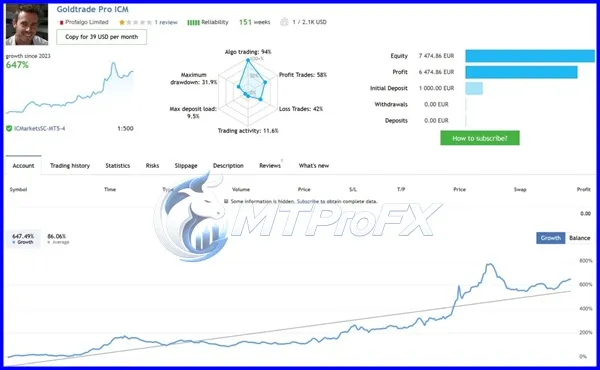
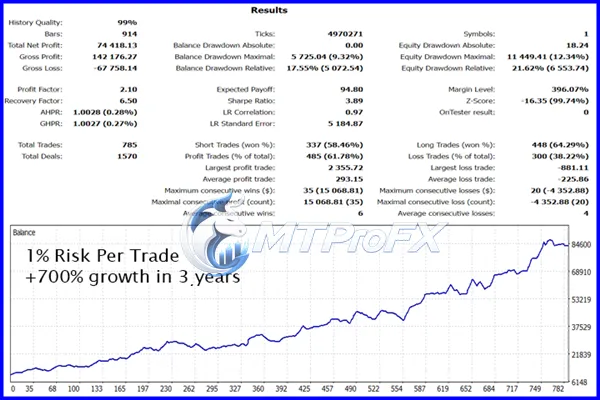
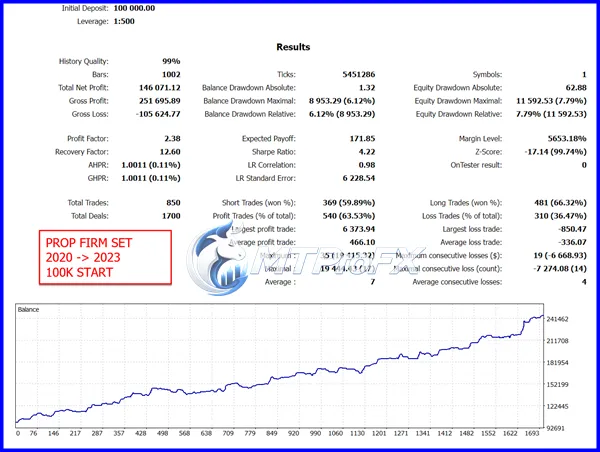
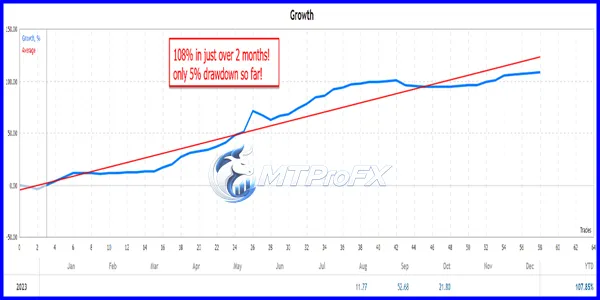
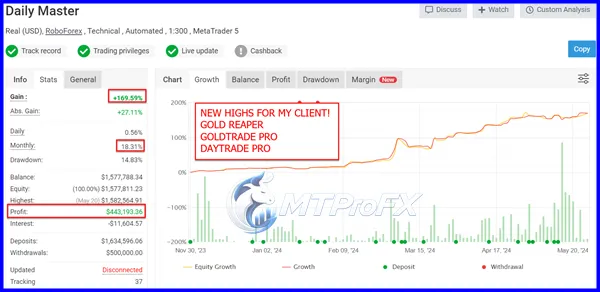
Backtest Results
Conclusion
For the best experience, traders should focus on proper risk management, broker compatibility, realistic expectations, backtesting, and demo forward testing. Avoid aggressive settings and never risk money you cannot afford to lose.
Risk Disclaimer: Forex and CFD trading involves substantial risk and may not be suitable for all investors. Past performance, backtests, and hypothetical results do not guarantee future results. Use automated trading software responsibly and conduct your own testing before trading with real funds.
What's Included
Login to add your review.
Useful tool for traders who don't want to monitor charts manually all day. The most important thing for me is using conservative risk settings.