
Gold Neural Core EA MT5 v1.5: Powerful XAUUSD Automated Forex Trading Tool
$16.99
94.69% OFF☑️ Gold Neural Core EA MT5 v1.5 is an automated Expert Advisor designed primarily for XAUUSD (Gold) trading on MetaTrader 5. The system combines momentum and trend analysis with adaptive grid management, AutoLot position sizing, ATR and rolling-volatility calculations, news-event controls, and account-level risk protections. Important: The information below describes the published configuration and available product information. Trading results are not guaranteed, and grid-based strategies can accumulate substantial exposure during adverse market moves. Always forward-test on a demo account before using real funds.
What is Gold Neural Core EA MT5 v1.5?
Recommended Trading Currency Pairs
Gold Neural Core EA MT5 v1.5 is specifically configured for XAUUSD, rather than being a conventional multi-currency Forex EA. Published instructions recommend attaching the EA to an XAUUSD chart, with the timeframe described as not being critical to its operation.
Although some EA configurations may technically be adaptable to other symbols, the available documentation does not establish the same optimization or intended performance for EURUSD, GBPUSD, USDJPY, or other currency pairs. Therefore, XAUUSD should be treated as the primary market.
Gold Neural Core EA MT5 v1.5 Features
Gold Neural Core EA MT5 v1.5 – Best Settings
For a more conservative starting approach, the published configuration can be used as a reference while reducing exposure before live deployment.
Recommended starting principles:
☑️ Symbol: XAUUSD
☑️ Platform: MetaTrader 5
☑️ Risk model: AutoLot
☑️ Starting lot: 0.01 when fixed-lot mode is used
☑️ AutoLot: Start conservatively rather than immediately selecting aggressive levels
☑️ Grid: Test thoroughly on demo before enabling it on a live account
☑️ ATR-based distance: Suitable for adapting grid behavior to volatility
☑️ News protection: Consider enabling appropriate filters around high-impact events
☑️ Drawdown alerts: Keep monitoring enabled
☑️ Emergency protection: Keep enabled
☑️ Maximum grid positions: Consider a substantially lower limit during initial testing
☑️ VPS: Recommended for uninterrupted automated execution
☑️ Account: A cent account can be useful for testing position sizing with smaller monetary exposure
The supplied configuration lists AutoLot 1.0 as a reference level and describes 1:500 or higher leverage as part of its intended setup. However, leverage should not be interpreted as a safety feature; higher leverage can increase available exposure and therefore risk.
One important point is that the reviewed v1.5 configuration has standard Stop Loss disabled while grid trading is enabled. This makes understanding grid exposure and account-level protection particularly important before live use.
Instructions for Installing Gold Neural Core EA MT5 v1.5
Download and install MetaTrader 5 from your broker or the official MetaTrader platform provider.
☑️ Step 2: Obtain the EA Files
The v1.5 package is published with the EA file and associated .set configuration files. The documented package includes files such as Gold Neural Core EA v1.5.ex5 and several Gold risk presets.
☑️ Step 3: Open the MT5 Data Folder
In MetaTrader 5:
File → Open Data Folder → MQL5 → Experts
Copy the Gold Neural Core .ex5 file into the Experts directory.
☑️ Step 4: Install the Preset Files
Place the supplied .set files in the appropriate MT5 preset folder if you intend to use the provided configurations.
☑️ Step 5: Restart or Refresh MT5
Restart MetaTrader 5 or refresh the Expert Advisors section in the Navigator.
☑️ Step 6: Open an XAUUSD Chart
Open an XAUUSD chart and attach Gold Neural Core EA MT5 v1.5 to it. The published instructions indicate that the EA is intended for XAUUSD and that the chart timeframe is not a primary requirement.
☑️ Step 7: Configure Risk
Select the desired AutoLot level or fixed-lot configuration. Begin with conservative exposure and verify that the position size is appropriate for your account.
☑️ Step 8: Enable Algo Trading
Make sure Algo Trading/AutoTrading is enabled in MT5 and verify that the EA is permitted to trade.
☑️ Step 9: Test on Demo
Run the EA through forward testing before considering live deployment. Pay particular attention to spread, slippage, margin utilization, floating drawdown, and the number of grid positions.
☑️ Step 10: Consider a VPS
For 24/7 operation, a reliable VPS can help keep the MT5 terminal running continuously.
Who Should Use Gold Neural Core EA MT5 v1.5?
☑️ Traders specifically interested in automated XAUUSD trading.
☑️ MT5 users who understand automated Expert Advisors.
☑️ Traders comfortable monitoring automated systems.
☑️ Users who understand the mechanics and risks of grid trading.
☑️ Traders who want configurable AutoLot and volatility-based position management.
☑️ Users with access to suitable margin and broker conditions.
☑️ Traders willing to perform demo and forward testing before live deployment.
It is not ideal for someone looking for a simple fixed-risk, single-position EA, particularly because the published v1.5 configuration uses grid functionality and can accumulate multiple positions.
Download Gold Neural Core EA MT5 v1.5
Download Gold Neural Core EA MT5 v1.5Pros and Cons
Pros
Cons
Backtest Results


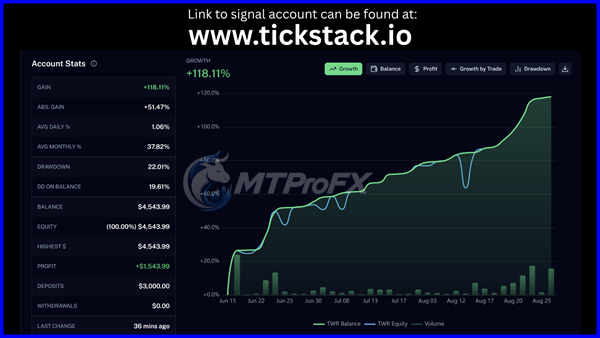
Final Verdict – Is Gold Neural Core EA MT5 v1.5 Worth It?
Its extensive configuration makes it flexible, but that flexibility also means traders need to understand exactly how position sizing, grid expansion, margin, and drawdown controls interact. The grid component is particularly important because multiple positions can accumulate during adverse price movement.
For SEO purposes, the strongest positioning is around “Gold Neural Core EA MT5 v1.5,” “XAUUSD EA,” “Gold trading EA,” “MT5 Gold Expert Advisor,” “automated Gold trading,” and “XAUUSD grid EA.” These terms accurately reflect the documented product focus without promising trading performance.
What's Included
Login to add your review.
A feature-rich EA for XAUUSD traders. The biggest thing to understand is that grid trading can build exposure quickly, so proper testing and account management are essential.