Back to Products
 0.0 (0 reviews)

Featured
Bestseller
Expert Advisors
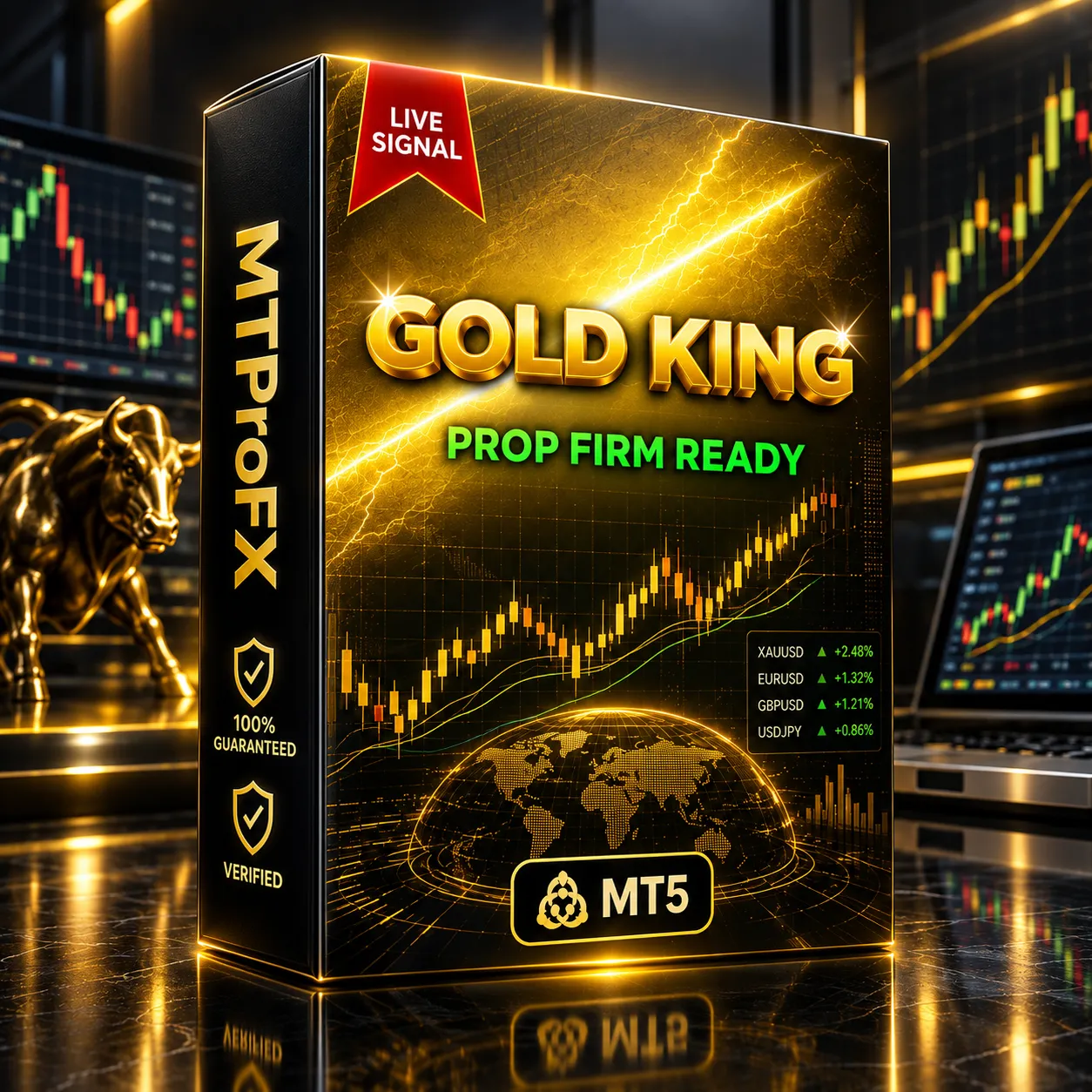
Gold King AI EA MT5 – Smart Automated Forex Trading Expert Advisor
$250.00
$16.99
93.2% OFFGold King AI EA MT5 is an automated Expert Advisor designed for MetaTrader 5 traders who want to automate their forex trading strategy. It can analyze market conditions, identify potential trading opportunities, and execute trades according to its programmed logic without requiring constant manual intervention. The EA is particularly suitable for traders interested in Gold (XAUUSD) and major forex pairs, while its actual performance will depend on market conditions, broker settings, spread, and risk management.
What is Gold King AI EA MT5?
☑️ Gold King AI EA MT5 is a MetaTrader 5 automated trading Expert Advisor designed to help traders automate market analysis and trade execution.
Instead of manually watching charts throughout the day, traders can install the EA on MT5 and configure its available parameters according to their trading preferences. Like any automated trading system, it should be properly tested on a demo account and historical data before being used with real funds.
Instead of manually watching charts throughout the day, traders can install the EA on MT5 and configure its available parameters according to their trading preferences. Like any automated trading system, it should be properly tested on a demo account and historical data before being used with real funds.
Recommended Trading Currency Pairs
Gold King AI EA MT5 can be considered for markets with good liquidity and relatively stable execution conditions.
Recommended markets include:
☑️ XAUUSD (Gold) – Primary choice for traders focusing on precious metals.
☑️ EURUSD – Highly liquid major forex pair.
☑️ GBPUSD – Suitable for traders comfortable with higher volatility.
☑️ USDJPY – Popular major pair with strong liquidity.
☑️ AUDUSD – Another major pair worth testing.
☑️ USDCAD – Can be tested as an additional forex market.
Tip: Do not assume that one setting works equally well across every pair. Test each currency pair individually because spread, volatility, session behavior, and broker execution can affect results.
Recommended markets include:
☑️ XAUUSD (Gold) – Primary choice for traders focusing on precious metals.
☑️ EURUSD – Highly liquid major forex pair.
☑️ GBPUSD – Suitable for traders comfortable with higher volatility.
☑️ USDJPY – Popular major pair with strong liquidity.
☑️ AUDUSD – Another major pair worth testing.
☑️ USDCAD – Can be tested as an additional forex market.
Tip: Do not assume that one setting works equally well across every pair. Test each currency pair individually because spread, volatility, session behavior, and broker execution can affect results.
Gold King AI EA MT5 Features
Automated Trading - Automates trade execution through MetaTrader 5, reducing the need to manually enter and manage every trade.
Market Analysis - The EA is designed to evaluate market conditions and identify potential trading opportunities based on its programmed strategy.
Fast Trade Execution - Automated execution can help reduce delays associated with manual order placement.
MetaTrader 5 Compatible - Gold King AI EA MT5 is designed specifically for the MT5 trading platform.
Adjustable Parameters - Traders can configure available EA parameters to match their preferred risk and trading approach.
Suitable for Multiple Markets - In addition to Gold, traders can backtest the EA on selected major forex pairs to determine where its strategy performs best.
Fully Automated Operation - Once properly configured and activated, the EA can operate automatically while MetaTrader 5 remains running.
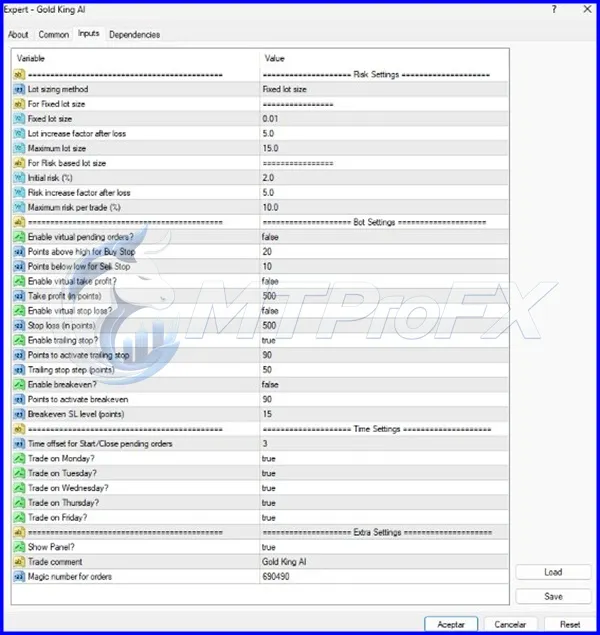
Gold King AI EA MT5 – Best Settings
There is no universally guaranteed "best setting" for an Expert Advisor because the optimal configuration can change depending on the broker, account type, spread, leverage, market volatility, and trading pair.
For safer testing:
☑️ Start with a demo account.
☑️ Use conservative risk settings initially.
☑️ Test XAUUSD separately from forex pairs.
☑️ Avoid immediately using maximum lot sizes.
☑️ Test different timeframes to identify the most consistent behavior.
☑️ Use historical backtesting before forward testing.
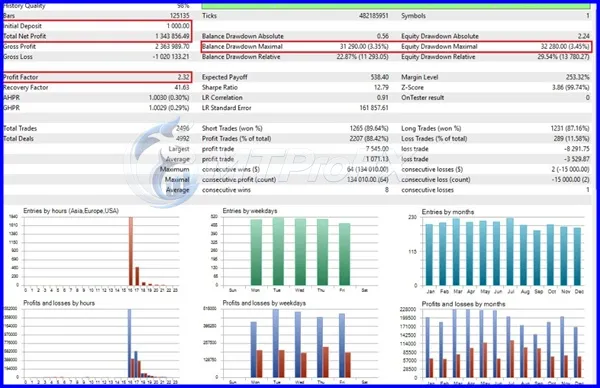
☑️ Monitor maximum drawdown rather than focusing only on profit.
☑️ Consider using a VPS if you require continuous automated operation.
☑️ Re-test settings after major market-condition changes.
For live trading, use only a risk level you can afford to lose.
For safer testing:
☑️ Start with a demo account.
☑️ Use conservative risk settings initially.
☑️ Test XAUUSD separately from forex pairs.
☑️ Avoid immediately using maximum lot sizes.
☑️ Test different timeframes to identify the most consistent behavior.
☑️ Use historical backtesting before forward testing.
☑️ Monitor maximum drawdown rather than focusing only on profit.
☑️ Consider using a VPS if you require continuous automated operation.
☑️ Re-test settings after major market-condition changes.
For live trading, use only a risk level you can afford to lose.
Instructions for Installing Gold King AI EA MT5
☑️ Step 1 – Download the EA
Download the Gold King AI EA MT5 files to your computer.
☑️ Step 2 – Open MetaTrader 5
Launch your MT5 trading platform.
☑️ Step 3 – Open the Data Folder
Go to:
File → Open Data Folder
Then navigate to:
MQL5 → Experts
☑️ Step 4 – Copy the EA
Copy the Gold King AI EA file into the Experts folder.
☑️ Step 5 – Restart MetaTrader 5
Close and reopen MT5 so the platform can recognize the newly installed Expert Advisor.
☑️ Step 6 – Find the EA
Open the Navigator window and locate Gold King AI EA under Expert Advisors.
☑️ Step 7 – Attach the EA
Open the desired chart and drag the EA onto the chart.
☑️ Step 8 – Enable Automated Trading
Make sure Algo Trading is enabled in MetaTrader 5.
☑️ Step 9 – Configure Settings
Adjust the available parameters according to your chosen risk level and trading strategy.
☑️ Step 10 – Test Before Going Live
Run the EA on a demo account and perform backtesting before considering real-money trading.
Download the Gold King AI EA MT5 files to your computer.
☑️ Step 2 – Open MetaTrader 5
Launch your MT5 trading platform.
☑️ Step 3 – Open the Data Folder
Go to:
File → Open Data Folder
Then navigate to:
MQL5 → Experts
☑️ Step 4 – Copy the EA
Copy the Gold King AI EA file into the Experts folder.
☑️ Step 5 – Restart MetaTrader 5
Close and reopen MT5 so the platform can recognize the newly installed Expert Advisor.
☑️ Step 6 – Find the EA
Open the Navigator window and locate Gold King AI EA under Expert Advisors.
☑️ Step 7 – Attach the EA
Open the desired chart and drag the EA onto the chart.
☑️ Step 8 – Enable Automated Trading
Make sure Algo Trading is enabled in MetaTrader 5.
☑️ Step 9 – Configure Settings
Adjust the available parameters according to your chosen risk level and trading strategy.
☑️ Step 10 – Test Before Going Live
Run the EA on a demo account and perform backtesting before considering real-money trading.
Who Should Use Gold King AI EA MT5?
Gold King AI EA MT5 may be suitable for:
☑️ Forex traders interested in automated trading.
☑️ MT5 users who want to reduce manual trade execution.
☑️ Traders interested in testing automated Gold strategies.
☑️ Beginners who want to learn how Expert Advisors operate.
☑️ Experienced traders looking to automate part of their strategy.
☑️ Traders who understand the importance of backtesting and risk management.
It is not suitable for someone expecting guaranteed profits or a completely risk-free trading system.
☑️ Forex traders interested in automated trading.
☑️ MT5 users who want to reduce manual trade execution.
☑️ Traders interested in testing automated Gold strategies.
☑️ Beginners who want to learn how Expert Advisors operate.
☑️ Experienced traders looking to automate part of their strategy.
☑️ Traders who understand the importance of backtesting and risk management.
It is not suitable for someone expecting guaranteed profits or a completely risk-free trading system.
Download Gold King AI EA MT5
Download Gold King AI EA MT5Pros and Cons
Pros
Automated trade execution
Designed for MetaTrader 5
Can be tested on Gold and forex pairs
Reduces the need for constant chart monitoring
Adjustable trading parameters
Supports systematic trading
Suitable for backtesting and demo testing
Cons
No trading EA can guarantee profits
Results can vary between brokers
Market volatility can affect performance
Poor risk settings can increase drawdown
Requires MT5 to remain active for continuous trading
Backtest results do not guarantee future performance
Backtest Results
Conclusion
☑️ Gold King AI EA MT5 provides an automated approach to forex and Gold trading through MetaTrader 5. Its ability to automate market analysis and trade execution can be useful for traders who prefer systematic strategies instead of constant manual chart monitoring.
For the best experience, traders should backtest the EA, forward-test it on a demo account, optimize settings for their broker and chosen market, and use responsible risk management. Past or simulated performance should never be treated as a guarantee of future results.
For the best experience, traders should backtest the EA, forward-test it on a demo account, optimize settings for their broker and chosen market, and use responsible risk management. Past or simulated performance should never be treated as a guarantee of future results.
What's Included
File Size
116 KB
File Type
ZIP
Downloads
123
Login to add your review.
charlsgeo@gmail.com
Oct 04, 2026
A useful automated trading tool for traders who want to experiment with algorithmic trading on MetaTrader 5.
Gold King AI EA MT5 is an automated Expert Advisor designed for the MetaTrader 5 platform. It is intended to automate market analysis and trade execution according to its programmed strategy.
Yes, XAUUSD (Gold) can be tested as one of the recommended markets. Traders should backtest the EA and determine suitable settings before live trading.
Yes. Major forex pairs such as EURUSD, GBPUSD, USDJPY, AUDUSD, and USDCAD can be tested, although results may vary between markets.
It can be useful for beginners who want to learn automated trading, but beginners should start with demo trading and understand the EA's settings and risks before using real money.
No. No Expert Advisor can guarantee profits. Trading performance depends on market conditions, settings, broker execution, spread, risk management, and other factors.
Yes. MetaTrader 5 provides Strategy Tester functionality that can be used to evaluate an Expert Advisor against historical market data.
Yes. This version is designed for MetaTrader 5 and is not intended for MetaTrader 4.
For continuous automated operation, MT5 needs to remain running. A reliable VPS can be used to keep the platform active when your personal computer is switched off.
There is no single risk level that is appropriate for everyone. Start conservatively, test the EA on a demo account, and increase risk only after thoroughly evaluating its drawdown and consistency.