
Global Trade Plan EA MT5 v2.90 – Automated Forex Trading Expert Advisor
$16.99
95.15% OFFGlobal Trade Plan EA MT5 v2.90 is an automated Expert Advisor designed for MetaTrader 5 (MT5) traders who want to execute a structured Forex trading plan without manually monitoring the market throughout the day. The EA can be configured according to trading preferences such as lot sizing, risk parameters, trading sessions, and entry/exit conditions. It is suitable for traders looking for systematic and automated execution while maintaining control over their risk and trading settings. As with any automated trading system, performance can vary depending on the broker, market conditions, spread, execution speed, and selected parameters.
What is Global Trade Plan EA MT5 v2.90?
It is suitable for traders looking for systematic and automated execution while maintaining control over their risk and trading settings. As with any automated trading system, performance can vary depending on the broker, market conditions, spread, execution speed, and selected parameters.
Recommended Trading Currency Pairs
Recommended pairs include:
✅ EUR/USD – High liquidity and typically competitive spreads.
✅ GBP/USD – Suitable for traders comfortable with higher volatility.
✅ USD/JPY – A highly traded major pair with strong liquidity.
✅ USD/CHF – Useful for diversification among major currency pairs.
✅ AUD/USD – A popular pair with good liquidity.
✅ EUR/GBP – Can be considered when seeking a lower-volatility major cross.
✅ EUR/JPY – Offers greater movement and may suit more active strategies.
For best results, traders should test the EA on their chosen pair and broker before committing significant capital. Avoid running too many highly correlated pairs simultaneously because this can increase overall account exposure.
Global Trade Plan EA MT5 v2.90 Features
Global Trade Plan EA MT5 v2.90 – Best Settings
For beginners, start with low-risk settings and use conservative lot sizing. If the EA provides a risk-percentage option, a cautious starting point is generally preferable to aggressive risk levels.
Use a sufficiently long historical testing period rather than optimizing only for recent market data. Testing different market conditions can help identify whether the configuration is robust.
A sensible optimization process is:
01) Select one liquid currency pair.
02) Choose an appropriate timeframe based on the EA's strategy and documentation.
03) Start with conservative risk parameters.
04) Backtest over multiple market cycles.
05) Perform out-of-sample testing.
06) Run the EA on a demo account.
07) Monitor drawdown, trade frequency, spread sensitivity, and execution.
08) Only then consider moving to a live account.
Avoid excessively increasing lot size simply because a backtest produces attractive returns. Drawdown and capital preservation should be considered alongside profitability.
Instructions for Installing Global Trade Plan EA MT5 v2.90
Download the Global Trade Plan EA MT5 v2.90 package and extract the files if they are provided in a ZIP archive.
✅ Step 2: Open MetaTrader 5
Launch your MT5 trading platform and select:
File → Open Data Folder
✅ Step 3: Locate the Experts Folder
Navigate to:
MQL5 → Experts
Copy the EA file into the Experts folder.
✅ Step 4: Restart MT5
Close and reopen MetaTrader 5, or refresh the Expert Advisors section inside the Navigator.
✅ Step 5: Attach the EA
Open your preferred trading chart, select the desired currency pair and timeframe, then drag Global Trade Plan EA MT5 v2.90 onto the chart.
✅ Step 6: Enable Automated Trading
Make sure the Algo Trading button is enabled and allow the required Expert Advisor permissions in the EA settings.
✅ Step 7: Configure Parameters
Adjust the available parameters, including risk, lot size, trading hours, stop-loss, take-profit, and other strategy-specific options according to your trading plan.
✅ Step 8: Test Before Going Live
Run a backtest and then use a demo account before deploying the EA with real money.
Who Should Use Global Trade Plan EA MT5 v2.90?
✅ Forex traders interested in automated trading.
✅ MT5 users who prefer systematic strategies.
✅ Traders who want to reduce manual trade execution.
✅ Beginners who want to learn how automated trading systems operate.
✅ Experienced traders who want to test an automated strategy.
✅ Traders who understand risk management and drawdown.
✅ Users who want to evaluate an EA through backtesting and demo trading.
It may not be appropriate for traders expecting guaranteed profits or a completely risk-free automated trading solution.
Download Global Trade Plan EA MT5 v2.90
Download Global Trade Plan EA MT5 v2.90Pros and Cons
Pros
Cons
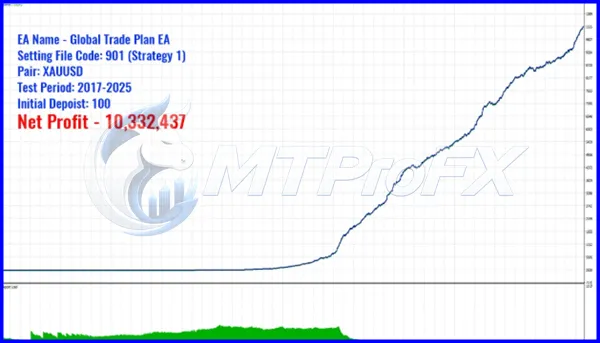
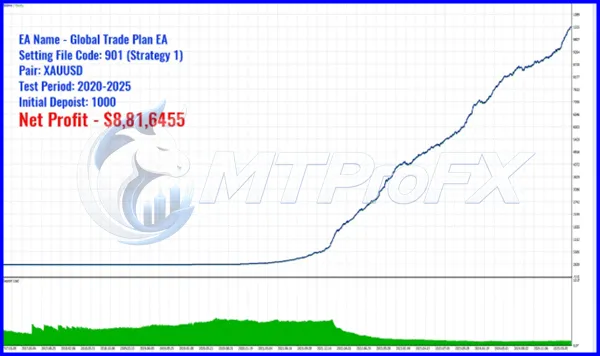
Backtest Results

Get Global Trade Plan EA MT5 v2.90 FREE (VIP Members Only)
Join a VIP Telegram group to get access. Pick your plan:
Final Verdict – Is Global Trade Plan EA MT5 v2.90 Worth It?
However, automation does not eliminate trading risk. Results can differ significantly depending on the currency pair, broker, spread, execution quality, market conditions, and configuration. Traders should therefore backtest the system, use conservative risk management, and evaluate it on a demo account before considering live deployment.
For traders seeking a structured MT5 automated Forex trading solution, Global Trade Plan EA MT5 v2.90 can be evaluated as part of a broader, disciplined trading plan.
What's Included
Login to add your review.
Easy to install and straightforward to configure. I tested it on a demo account first and liked the systematic approach. The MT5 integration works smoothly for my setup.