Back to Products
 0.0 (0 reviews)
Featured
Bestseller
Expert Advisors
Friday Pro EA MT4 V1.6 – Myfxbook Verified Forex Trading Robot | Automated Expert Advisor
$399.00
$16.99
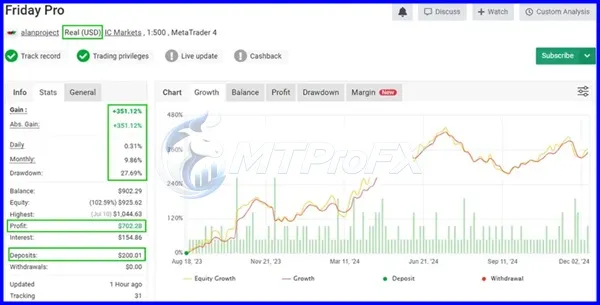
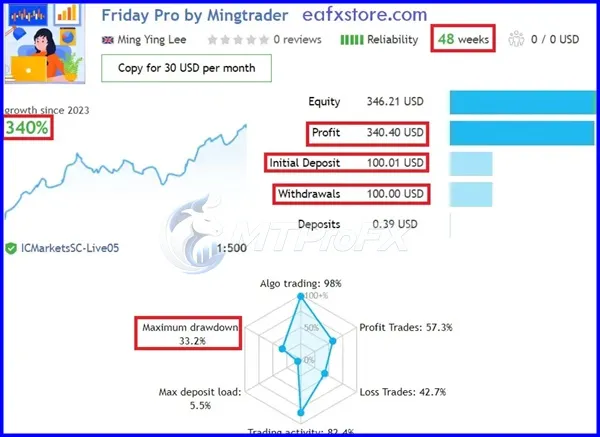
95.74% OFFFriday Pro EA MT4 V1.6 is an automated Forex Expert Advisor designed for MetaTrader 4. With automated trade execution, configurable risk management, and strategy-based market analysis, the EA is built to help traders streamline their trading workflow. The Myfxbook Verified designation can provide additional transparency when evaluating externally published trading results, but past performance does not guarantee future results.
What is Friday Pro EA MT4 V1.6?
Friday Pro EA MT4 V1.6 is an automated Forex Expert Advisor designed for MetaTrader 4. With automated trade execution, configurable risk management, and strategy-based market analysis, the EA is built to help traders streamline their trading workflow. The Myfxbook Verified designation can provide additional transparency when evaluating externally published trading results, but past performance does not guarantee future results.
Recommended Trading Currency Pairs
Friday Pro EA MT4 V1.6 can be considered for major and selected minor Forex pairs, depending on the strategy configuration and broker conditions.
Common pairs to evaluate include:
✅ EURUSD
✅ GBPUSD
✅ USDJPY
✅ USDCHF
✅ AUDUSD
✅ USDCAD
✅ NZDUSD
Tip: Always test the EA on a demo account first and verify that the selected pair, spread, execution speed, and broker conditions are suitable for the EA.
Common pairs to evaluate include:
✅ EURUSD
✅ GBPUSD
✅ USDJPY
✅ USDCHF
✅ AUDUSD
✅ USDCAD
✅ NZDUSD
Tip: Always test the EA on a demo account first and verify that the selected pair, spread, execution speed, and broker conditions are suitable for the EA.
Friday Pro EA MT4 V1.6 Features
Automated trade execution on MetaTrader 4
Strategy-based market analysis
Configurable trading parameters
Adjustable risk-management options
Compatible with multiple Forex currency pairs
Designed for hands-free automated trading
Supports backtesting through MT4 Strategy Tester
Can operate continuously while MT4 is running
Myfxbook Verified performance reference
Suitable for both testing and live-trading environments
Friday Pro EA MT4 V1.6 – Best Settings
There is no single best setting for Friday Pro EA MT4 V1.6 because optimal parameters depend on the currency pair, broker, account balance, spread, leverage, and market conditions.
For safer testing:
✅ Start with a demo account.
✅ Use conservative risk and lot settings.
✅ Test one currency pair at a time.
✅ Avoid increasing lot sizes simply because previous trades were profitable.
✅ Compare different timeframes through historical backtesting.
✅ Use the broker's actual spread and trading conditions during testing.
✅ Monitor drawdown rather than focusing only on total profit.
✅ Forward-test the chosen configuration before considering live deployment.
For safer testing:
✅ Start with a demo account.
✅ Use conservative risk and lot settings.
✅ Test one currency pair at a time.
✅ Avoid increasing lot sizes simply because previous trades were profitable.
✅ Compare different timeframes through historical backtesting.
✅ Use the broker's actual spread and trading conditions during testing.
✅ Monitor drawdown rather than focusing only on total profit.
✅ Forward-test the chosen configuration before considering live deployment.
Instructions for Installing Friday Pro EA MT4 V1.6
✅ Step 01 - Download the Friday Pro EA MT4 V1.6 files.
✅ Step 02 - Open MetaTrader 4.
✅ Step 03 - Select File → Open Data Folder.
✅ Step 04 - Open the MQL4 → Experts folder.
✅ Step 05 - Copy the EA .ex4 or .mq4 file into the Experts folder.
✅ Step 06 - Restart MetaTrader 4 or refresh the Expert Advisors section.
✅ Step 07 - Open the desired currency-pair chart.
✅ Step 08 - Select Friday Pro EA from the Navigator window and attach it to the chart.
✅ Step 09 - Configure the available EA parameters.
✅ Step 10 - Enable AutoTrading in MT4.
✅ Step 11 - Confirm that the EA smile/status indicator appears correctly on the chart.
✅ Step 12 - Test the configuration on a demo account before using real funds.
✅ Step 02 - Open MetaTrader 4.
✅ Step 03 - Select File → Open Data Folder.
✅ Step 04 - Open the MQL4 → Experts folder.
✅ Step 05 - Copy the EA .ex4 or .mq4 file into the Experts folder.
✅ Step 06 - Restart MetaTrader 4 or refresh the Expert Advisors section.
✅ Step 07 - Open the desired currency-pair chart.
✅ Step 08 - Select Friday Pro EA from the Navigator window and attach it to the chart.
✅ Step 09 - Configure the available EA parameters.
✅ Step 10 - Enable AutoTrading in MT4.
✅ Step 11 - Confirm that the EA smile/status indicator appears correctly on the chart.
✅ Step 12 - Test the configuration on a demo account before using real funds.
Who Should Use Friday Pro EA MT4 V1.6?
Friday Pro EA MT4 V1.6 may be suitable for:
✅ Forex traders interested in automated trading
✅ MT4 users who want to automate strategy execution
✅ Traders interested in systematic trading approaches
✅ Users who want to backtest an Expert Advisor
✅ Experienced traders who understand automated-trading risks
It may not be suitable for someone looking for guaranteed profits or completely risk-free trading.
✅ Forex traders interested in automated trading
✅ MT4 users who want to automate strategy execution
✅ Traders interested in systematic trading approaches
✅ Users who want to backtest an Expert Advisor
✅ Experienced traders who understand automated-trading risks
It may not be suitable for someone looking for guaranteed profits or completely risk-free trading.
Download Friday Pro EA MT4 V1.6
Download Friday Pro EA MT4 V1.6Pros and Cons
Pros
Automated trade execution
Works with MetaTrader 4
Configurable parameters
Supports strategy testing
Can reduce the need for manual order execution
Myfxbook Verified reference can help with performance evaluation
Cons
No EA can guarantee profits
Results can vary between brokers
Market conditions can affect performance
Requires proper risk management
Incorrect settings can increase trading risk
Requires monitoring and periodic testing
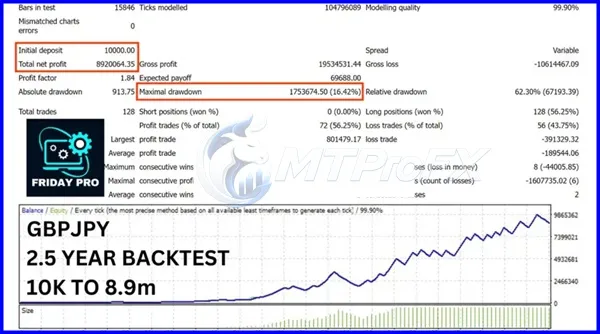
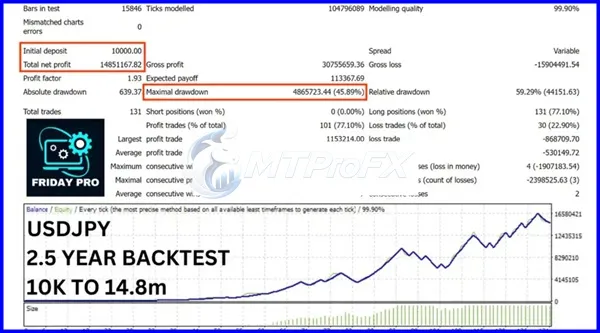
Backtest Results
Get Friday Pro EA MT4 V1.6 FREE (VIP Members Only)
Join a VIP Telegram group to get access. Pick your plan:
Conclusion
Friday Pro EA MT4 V1.6 offers an automated approach to Forex trading through MetaTrader 4, with configurable parameters and automated execution. The Myfxbook Verified reference can be useful when assessing available performance records, but traders should still conduct their own due diligence.
For best results, start with demo testing, conservative risk settings, backtesting, and forward testing before considering real-money trading. Forex trading involves substantial risk, and historical or verified performance does not guarantee future results.
For best results, start with demo testing, conservative risk settings, backtesting, and forward testing before considering real-money trading. Forex trading involves substantial risk, and historical or verified performance does not guarantee future results.
What's Included
File Size
2.1 MB
File Type
ZIP
Downloads
157
Login to add your review.
ryansharma@gmail.com
Aug 30, 2026
A convenient automated trading solution for MT4. Risk settings are important, so I would definitely recommend conservative testing first.
Friday Pro EA MT4 V1.6 is an automated Forex Expert Advisor designed to execute trades through the MetaTrader 4 platform.
It is designed for automated trade execution after being installed and configured correctly in MT4. Users should still monitor their trading environment and EA performance.
Major Forex pairs such as EURUSD, GBPUSD, USDJPY, USDCHF, AUDUSD, USDCAD, and NZDUSD can be evaluated. Actual suitability depends on the EA's strategy and configuration.
There is no universal best setting. The appropriate configuration depends on the currency pair, broker, account size, risk tolerance, and market conditions. Demo testing and backtesting are recommended.
No. No Forex EA can guarantee profits. Trading performance can change because of market volatility, spreads, slippage, broker execution, and other factors.
Myfxbook verification is a process associated with externally published trading-account statistics. It can help users assess whether reported account information has undergone verification, but it should not be interpreted as a guarantee of future performance.
Yes, MT4's Strategy Tester can be used to evaluate an Expert Advisor against historical market data where the EA and testing setup support it.
Yes. Automated trading does not eliminate market or technical risks. Regular monitoring can help identify issues involving connectivity, spreads, execution, drawdown, or unexpected market conditions.
Beginners can use it for demo testing and learning, but they should understand MT4, Expert Advisors, leverage, drawdown, and risk management before trading real money.