Back to Products
 0.0 (0 reviews)
Bestseller
Expert Advisors
Bitcoin Wizard EA MT4 V3.10 – Automated Bitcoin Scalping & Trend Following EA for MT4
$499.00
$16.99
96.6% OFFBitcoin Wizard EA MT4 V3.10 is a fully automated MT4 trading robot that analyzes market conditions, opens and manages trades automatically, and incorporates advanced risk-management techniques. The EA is designed to optimize trading performance while minimizing manual intervention.
What is Bitcoin Wizard EA MT4 V3.10?
Bitcoin Wizard EA MT4 V3.10 is an automated trading Expert Advisor (EA) developed for the MetaTrader 4 platform. The system is designed to identify profitable market opportunities using advanced market analysis algorithms and automated trade execution. It helps traders eliminate emotional decision-making while maintaining consistent market participation.
The EA is suitable for traders seeking hands-free trading and can operate continuously whenever the MT4 platform remains connected to the broker's server.
The EA is suitable for traders seeking hands-free trading and can operate continuously whenever the MT4 platform remains connected to the broker's server.
Recommended Trading Currency Pairs
For optimal performance, Bitcoin Wizard EA MT4 V3.10 is commonly used on:
✅ BTCUSD (Bitcoin)
✅ XAUUSD (Gold)
✅ EURUSD
✅ GBPUSD
✅ USDJPY
✅ USDCAD
✅ AUDUSD
Recommended Timeframe
✅ H1 (1 Hour)
✅ H4 (4 Hour)
✅ Platform
✅ MetaTrader 4 (MT4)
Broker Requirements
✅ Low-spread broker
✅ Fast execution
✅ VPS recommended for 24/7 operation
✅ BTCUSD (Bitcoin)
✅ XAUUSD (Gold)
✅ EURUSD
✅ GBPUSD
✅ USDJPY
✅ USDCAD
✅ AUDUSD
Recommended Timeframe
✅ H1 (1 Hour)
✅ H4 (4 Hour)
✅ Platform
✅ MetaTrader 4 (MT4)
Broker Requirements
✅ Low-spread broker
✅ Fast execution
✅ VPS recommended for 24/7 operation
Bitcoin Wizard EA MT4 V3.10 Features
Fully Automated Trading - Executes trades automatically without manual intervention.
Advanced Market Analysis - Uses built-in algorithms to identify high-probability trading opportunities.
Smart Risk Management - Includes stop loss and money management functions to help control trading risk.
Trade Management System - Automatically manages open positions and adjusts orders according to market conditions.
User-Friendly Configuration - Simple setup suitable for both beginners and experienced traders.
Multi-Asset Compatibility - Can be applied to multiple trading instruments depending on broker availability.
Optimized for MT4 - Designed specifically for MetaTrader 4 to ensure smooth performance.
VPS Friendly - Supports continuous operation on VPS servers for uninterrupted trading.
Bitcoin Wizard EA MT4 V3.10 – Best Settings
The following settings are commonly recommended for stable performance:
✅ Account Type: ECN or Raw Spread
✅ Minimum Deposit: $500 or higher
✅ Risk Level: 1%–3% per trade for conservative trading
✅ Timeframe: H1
✅ Auto Trading: Enabled
✅ VPS Usage: Recommended
✅ Spread Filter: Enabled
✅ News Filter: Enabled if available
✅ Leverage: 1:100 or higher
Conservative traders should use lower risk settings, while aggressive traders may increase risk according to their account size and risk tolerance.
✅ Account Type: ECN or Raw Spread
✅ Minimum Deposit: $500 or higher
✅ Risk Level: 1%–3% per trade for conservative trading
✅ Timeframe: H1
✅ Auto Trading: Enabled
✅ VPS Usage: Recommended
✅ Spread Filter: Enabled
✅ News Filter: Enabled if available
✅ Leverage: 1:100 or higher
Conservative traders should use lower risk settings, while aggressive traders may increase risk according to their account size and risk tolerance.
Instructions for Installing Bitcoin Wizard EA MT4 V3.10
✅ Step 1
Download the Bitcoin Wizard EA MT4 V3.10 files.
✅ Step 2
Open MetaTrader 4.
✅ Step 3
Click:
File → Open Data Folder
✅ Step 4
Navigate to:
MQL4 → Experts
✅ Step 5
Copy the EA file into the Experts folder.
✅ Step 6
Restart MetaTrader 4.
✅ Step 7
Open the Navigator panel and locate Bitcoin Wizard EA.
✅ Step 8
Drag and drop the EA onto your preferred chart.
✅ Step 9
Enable:
AutoTrading
Allow Live Trading
DLL Imports (if required)
✅ Step 10
Configure settings according to your risk preference and start automated trading.
Download the Bitcoin Wizard EA MT4 V3.10 files.
✅ Step 2
Open MetaTrader 4.
✅ Step 3
Click:
File → Open Data Folder
✅ Step 4
Navigate to:
MQL4 → Experts
✅ Step 5
Copy the EA file into the Experts folder.
✅ Step 6
Restart MetaTrader 4.
✅ Step 7
Open the Navigator panel and locate Bitcoin Wizard EA.
✅ Step 8
Drag and drop the EA onto your preferred chart.
✅ Step 9
Enable:
AutoTrading
Allow Live Trading
DLL Imports (if required)
✅ Step 10
Configure settings according to your risk preference and start automated trading.
Who Should Use Bitcoin Wizard EA MT4 V3.10?
This EA is ideal for:
✅ Beginner Traders
Those who want automated trade execution without extensive market analysis.
✅ Busy Professionals
Individuals who cannot monitor charts throughout the day.
✅ Forex Enthusiasts
Traders seeking algorithmic trading solutions.
✅ VPS Users
Those running automated systems continuously.
✅ Portfolio Diversification Traders
Investors looking to add automated strategies to their trading portfolio.
✅ Beginner Traders
Those who want automated trade execution without extensive market analysis.
✅ Busy Professionals
Individuals who cannot monitor charts throughout the day.
✅ Forex Enthusiasts
Traders seeking algorithmic trading solutions.
✅ VPS Users
Those running automated systems continuously.
✅ Portfolio Diversification Traders
Investors looking to add automated strategies to their trading portfolio.
Download Bitcoin Wizard EA MT4 V3.10
Download Bitcoin Wizard EA V3.10Pros and Cons
Pros
Fully automated operation
Eliminates emotional trading
Easy installation and setup
Supports multiple instruments
Compatible with MT4
Suitable for VPS hosting
Built-in risk management features
Cons
No trading system guarantees profits
Performance depends on broker conditions
Requires continuous platform operation
Market volatility can affect results
VPS may be required for best performance
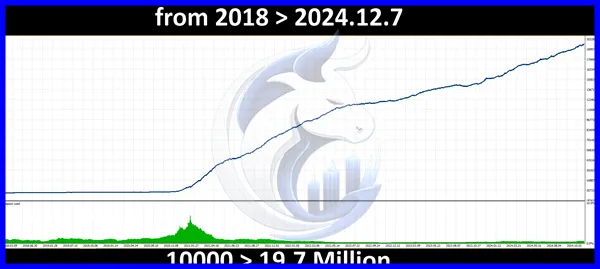
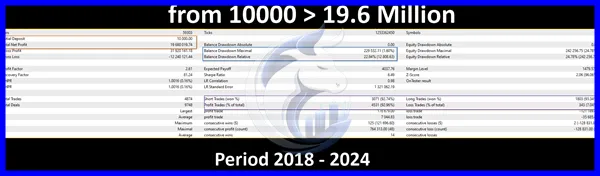
Backtest Results
Conclusion
Bitcoin Wizard EA MT4 V3.10 is a powerful automated trading solution for MetaTrader 4 users seeking a hands-free approach to Forex and cryptocurrency trading. With automated execution, built-in risk management, multi-asset compatibility, and VPS support, it offers a practical solution for traders looking to automate their strategies. As with any trading system, proper risk management and realistic expectations remain essential for long-term success.
What's Included
File Size
4.76MB
File Type
ZIP
Downloads
81
Login to add your review.
jasonwhite009@gmail.com
Jun 22, 2026
The EA handles trades efficiently and saves a lot of screen time. Worth trying for automated trading enthusiasts.
Yes. The EA automatically analyzes the market, opens trades, manages positions, and closes orders according to its programmed strategy.
It is designed exclusively for MetaTrader 4 (MT4).
Yes. The installation and configuration process is relatively straightforward.
A minimum deposit of $500 is generally recommended, though requirements may vary depending on trading conditions and risk settings.
Yes. Running the EA on a VPS is highly recommended for uninterrupted operation.
BTCUSD, XAUUSD, EURUSD, GBPUSD, USDJPY, and AUDUSD are commonly recommended.
No. All trading involves risk, and no Expert Advisor can guarantee profits under all market conditions.
Yes. Users can adjust risk levels, lot sizing, and other available parameters according to their trading preferences.