Back to Products
 0.0 (0 reviews)

Featured
Bestseller
Expert Advisors
Apache MHL Moving Average EA MT5 V1.9 – Powerful Forex Trading Tool
$310.00
$16.99
94.52% OFFApache MHL Moving Average EA MT5 V1.9 is a MetaTrader 5 Expert Advisor designed around moving-average-based trading logic. It can help traders automate market analysis, entry decisions, and trade management according to the EA’s configured parameters. As with any automated forex strategy, performance can vary depending on the currency pair, timeframe, broker conditions, spread, and market environment. Traders should backtest and forward-test the EA before using it on a live account.
What is Apache MHL Moving Average EA MT5 V1.9?
Apache MHL Moving Average EA MT5 V1.9 is a MetaTrader 5 Expert Advisor designed around moving-average-based trading logic. It can help traders automate market analysis, entry decisions, and trade management according to the EA’s configured parameters.
As with any automated forex strategy, performance can vary depending on the currency pair, timeframe, broker conditions, spread, and market environment. Traders should backtest and forward-test the EA before using it on a live account.
As with any automated forex strategy, performance can vary depending on the currency pair, timeframe, broker conditions, spread, and market environment. Traders should backtest and forward-test the EA before using it on a live account.
Recommended Trading Currency Pairs
Apache MHL Moving Average EA MT5 V1.9 can be tested on major and liquid forex pairs where spreads and execution conditions are generally favorable.
Recommended pairs to consider include:
✅ EUR/USD – High liquidity and typically competitive spreads.
✅ GBP/USD – Suitable for traders looking for stronger price movement.
✅ USD/JPY – Popular major pair with substantial liquidity.
✅ USD/CHF – Useful for diversification and trend-based testing.
✅ AUD/USD – Often considered for systematic forex strategies.
✅ USD/CAD – Can provide additional diversification.
✅ EUR/JPY – A more volatile cross pair suitable for careful testing.
The best pair is not necessarily the same for every broker or account. Run separate backtests for each pair before selecting your preferred market.
Recommended pairs to consider include:
✅ EUR/USD – High liquidity and typically competitive spreads.
✅ GBP/USD – Suitable for traders looking for stronger price movement.
✅ USD/JPY – Popular major pair with substantial liquidity.
✅ USD/CHF – Useful for diversification and trend-based testing.
✅ AUD/USD – Often considered for systematic forex strategies.
✅ USD/CAD – Can provide additional diversification.
✅ EUR/JPY – A more volatile cross pair suitable for careful testing.
The best pair is not necessarily the same for every broker or account. Run separate backtests for each pair before selecting your preferred market.
Apache MHL Moving Average EA MT5 V1.9 Features
MetaTrader 5 compatibility
Automated trading functionality
Moving-average-based market analysis
Systematic trade-entry logic
Reduced need for manual chart monitoring
Configurable trading parameters
Potentially suitable for multiple currency pairs
Backtesting support through MetaTrader 5
Designed for algorithmic forex trading
Can operate according to predefined trading rules
Useful for testing systematic trading approaches
Suitable for demo-account evaluation before live deployment
Apache MHL Moving Average EA MT5 V1.9 – Best Settings
There is no universal “best setting” that guarantees profitable results. The optimal configuration depends on the currency pair, timeframe, broker, spread, account size, and market conditions.
For a sensible starting process, traders can begin with moderate risk settings rather than aggressive configurations. Test the EA on major pairs such as EUR/USD and USD/JPY first, then compare different timeframes using MetaTrader 5's Strategy Tester.
When optimizing the EA, pay particular attention to:
✅ Moving-average parameters
✅ Trading timeframe
✅ Lot size or risk percentage
✅ Stop-loss configuration
✅ Take-profit settings
✅ Maximum number of simultaneous trades
✅ Trading-session restrictions
✅ Spread limitations
✅ Drawdown controls
✅ Any available trailing-stop parameters
Avoid optimizing settings exclusively for historical profit. A configuration that performs exceptionally well on one historical period may be overfitted and perform poorly in future markets.
Recommended approach: Backtest → optimize conservatively → perform out-of-sample testing → forward-test on demo → move to live trading only after satisfactory results.
For a sensible starting process, traders can begin with moderate risk settings rather than aggressive configurations. Test the EA on major pairs such as EUR/USD and USD/JPY first, then compare different timeframes using MetaTrader 5's Strategy Tester.
When optimizing the EA, pay particular attention to:
✅ Moving-average parameters
✅ Trading timeframe
✅ Lot size or risk percentage
✅ Stop-loss configuration
✅ Take-profit settings
✅ Maximum number of simultaneous trades
✅ Trading-session restrictions
✅ Spread limitations
✅ Drawdown controls
✅ Any available trailing-stop parameters
Avoid optimizing settings exclusively for historical profit. A configuration that performs exceptionally well on one historical period may be overfitted and perform poorly in future markets.
Recommended approach: Backtest → optimize conservatively → perform out-of-sample testing → forward-test on demo → move to live trading only after satisfactory results.
Instructions for Installing Apache MHL Moving Average EA MT5 V1.9
Follow these general steps to install Apache MHL Moving Average EA MT5 V1.9:
✅ Step 1: Download the EA
Obtain the Apache MHL Moving Average EA MT5 V1.9 files from the official or authorized source.
✅ Step 2: Open MetaTrader 5
Launch your MetaTrader 5 trading platform.
✅ Step 3: Open the Data Folder
Go to:
File → Open Data Folder
Then navigate to:
MQL5 → Experts
✅ Step 4: Copy the EA
Place the EA file, normally with an .ex5 extension, inside the Experts folder.
✅ Step 5: Restart MetaTrader 5
Restart MT5, or refresh the Expert Advisors section in the Navigator panel.
✅ Step 6: Attach the EA to a Chart
Find Apache MHL Moving Average EA MT5 V1.9 under:
Navigator → Expert Advisors
Drag it onto your preferred chart.
✅ Step 7: Enable Automated Trading
Make sure Algo Trading is enabled in MetaTrader 5 and allow the required permissions in the EA settings.
✅ Step 8: Configure and Test
Set your preferred parameters and test the EA using the Strategy Tester and preferably a demo account before considering live deployment.
✅ Step 1: Download the EA
Obtain the Apache MHL Moving Average EA MT5 V1.9 files from the official or authorized source.
✅ Step 2: Open MetaTrader 5
Launch your MetaTrader 5 trading platform.
✅ Step 3: Open the Data Folder
Go to:
File → Open Data Folder
Then navigate to:
MQL5 → Experts
✅ Step 4: Copy the EA
Place the EA file, normally with an .ex5 extension, inside the Experts folder.
✅ Step 5: Restart MetaTrader 5
Restart MT5, or refresh the Expert Advisors section in the Navigator panel.
✅ Step 6: Attach the EA to a Chart
Find Apache MHL Moving Average EA MT5 V1.9 under:
Navigator → Expert Advisors
Drag it onto your preferred chart.
✅ Step 7: Enable Automated Trading
Make sure Algo Trading is enabled in MetaTrader 5 and allow the required permissions in the EA settings.
✅ Step 8: Configure and Test
Set your preferred parameters and test the EA using the Strategy Tester and preferably a demo account before considering live deployment.
Who Should Use Apache MHL Moving Average EA MT5 V1.9?
This EA may be suitable for:
✅ Forex traders interested in automated trading.
✅ MT5 users who prefer systematic strategies.
✅ Traders who want to reduce manual chart monitoring.
✅ Beginners learning about Expert Advisors and algorithmic trading.
✅ Experienced traders testing moving-average strategies.
✅ Traders interested in backtesting automated systems.
✅ Users who want to experiment with predefined trading rules.
It may not be appropriate for traders expecting guaranteed profits or completely risk-free automated trading.
✅ Forex traders interested in automated trading.
✅ MT5 users who prefer systematic strategies.
✅ Traders who want to reduce manual chart monitoring.
✅ Beginners learning about Expert Advisors and algorithmic trading.
✅ Experienced traders testing moving-average strategies.
✅ Traders interested in backtesting automated systems.
✅ Users who want to experiment with predefined trading rules.
It may not be appropriate for traders expecting guaranteed profits or completely risk-free automated trading.
Download Apache MHL Moving Average EA MT5 V1.9
Download Apache MHL Moving Average EA MT5Pros and Cons
Pros
Works with MetaTrader 5.
Automates predefined trading rules.
Can reduce emotional decision-making.
Supports systematic backtesting.
Potentially useful across multiple forex pairs.
Saves time compared with continuously monitoring charts.
Configurable parameters may allow strategy customization.
Cons
No EA can guarantee consistent profits.
Results can vary significantly between currency pairs.
Market conditions can affect performance.
Poor parameter optimization can increase drawdown.
Backtested performance does not guarantee future results.
Requires appropriate risk management.
Broker spreads and execution can influence results.
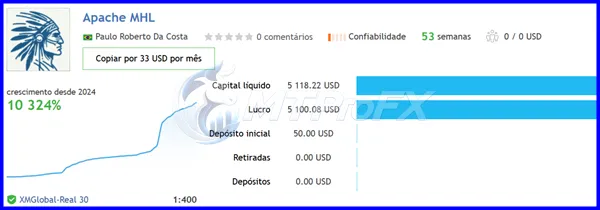
Backtest Results
Get Apache MHL Moving Average EA MT5 V1.9 FREE (VIP Members Only)
Join a VIP Telegram group to get access. Pick your plan:
Final Verdict – Is Apache MHL Moving Average EA MT5 V1.9 Worth It?
Apache MHL Moving Average EA MT5 V1.9 can be an interesting option for traders exploring automated, moving-average-based forex strategies on MetaTrader 5. Its greatest value is the ability to execute a predefined approach systematically without requiring constant manual chart monitoring.
However, traders should avoid treating historical results as a guarantee of future performance. Thorough backtesting, conservative risk management, realistic trading conditions, and demo forward-testing are essential before deploying any automated strategy with real money.
However, traders should avoid treating historical results as a guarantee of future performance. Thorough backtesting, conservative risk management, realistic trading conditions, and demo forward-testing are essential before deploying any automated strategy with real money.
What's Included
File Size
39.3 KB
File Type
ZIP
Downloads
210
Login to add your review.
wilsonandrew2@gmail.com
Sep 03, 2026
Good concept for systematic forex trading. I would recommend starting with demo testing and conservative risk parameters before considering real-money trading.
Apache MHL Moving Average EA MT5 V1.9 is an Expert Advisor for MetaTrader 5 that uses moving-average-oriented trading logic to automate forex trading according to configured parameters.
Profitability cannot be guaranteed. Results depend on market conditions, settings, currency pair, timeframe, broker execution, spread, and risk management.
Major pairs such as EUR/USD, GBP/USD, USD/JPY, USD/CHF, AUD/USD, and USD/CAD are reasonable candidates for initial testing because of their liquidity. However, each pair should be independently backtested.
There is no universally best timeframe. Test multiple timeframes and select one based on robust historical and forward-testing results rather than simply choosing the timeframe with the highest backtest profit.
Yes, beginners can use it as an introduction to automated trading, but they should first learn MT5 basics, understand drawdown and risk management, and test the EA on a demo account.
Potentially, if the EA is compatible with your broker and account conditions. However, conduct extensive backtesting and demo forward-testing before risking real capital.
No. Forex trading involves substantial risk, and an Expert Advisor cannot guarantee profits or eliminate losses.
Use MetaTrader 5 Strategy Tester for historical testing, then perform out-of-sample and forward testing on a demo account. Evaluate profitability, drawdown, trade frequency, and consistency rather than focusing only on net profit.