
3X COMBO AI EA v7.60 MT5 – Scalping, Grid & Hedging Expert Advisor
$16.99
95% OFF3X COMBO AI EA v7.60 MT5 is an automated Forex trading Expert Advisor designed for the MetaTrader 5 (MT5) platform. As its name suggests, the EA combines multiple trading approaches into one automated system, making it suitable for traders looking to explore scalping, grid-style trading, trend-based entries, and hedging-style risk management from a single MT5 robot. The EA is designed to automate trade analysis and execution, helping reduce the need for manual market monitoring. Traders can configure parameters such as lot sizing, risk controls, trading sessions, take-profit, stop-loss, and other strategy options according to their preferred trading style.
What is 3X COMBO AI EA v7.60 MT5?
Depending on the available settings and the version's configuration, traders may use the EA for automated entries, position management, risk control, and strategy execution without manually opening every trade.
The EA is particularly relevant to traders interested in experimenting with automated Forex scalping, grid trading, and hedging strategies.
Recommended Trading Currency Pairs
Recommended pairs to consider for testing include:
✅ EUR/USD – High liquidity and generally competitive spreads.
✅ GBP/USD – Suitable for traders comfortable with higher volatility.
✅ USD/JPY – Popular major pair with substantial liquidity.
✅ AUD/USD – Often considered for automated systems because of its liquidity.
✅ USD/CAD – Can be tested with appropriate risk settings.
✅ EUR/GBP – Useful for traders wanting to test a lower-volatility cross.
✅ XAU/USD (Gold) – May be supported depending on the EA's configuration, but should be tested separately because gold can experience significantly higher volatility than major Forex pairs.
For grid or hedging configurations, traders should be particularly careful with volatile instruments because multiple open positions can increase exposure quickly.
3X COMBO AI EA v7.60 MT5 Features
3X COMBO AI EA v7.60 MT5 – Best Settings
For beginners, consider starting with:
✅ Trading timeframe: M15 or H1 for initial testing. Avoid assuming that a lower timeframe will automatically produce better results.
✅ Lot size: Use a small fixed lot or a conservative risk-based setting. A starting risk of around 0.5%–1% per trade can be considered for testing, depending on the account and strategy.
✅ Maximum open trades: Keep the number of simultaneous positions conservative, particularly when testing grid or hedging configurations.
✅ Stop Loss: Use a defined maximum-loss level whenever the strategy permits it.
✅ Take Profit: Configure TP according to the strategy's expected risk-to-reward characteristics rather than choosing an arbitrary value.
✅ Spread filter: Enable a spread limitation if the EA provides this option. Avoid opening trades during unusually wide spreads.
✅ Trading session: Focus initial testing on liquid market sessions and avoid periods where spreads and execution quality deteriorate.
✅ News filter: If available, consider using a high-impact news filter, particularly for strategies that are sensitive to sudden volatility.
✅ Auto Lot/Risk: If supported, use conservative risk percentages rather than aggressive compounding.
For grid-based configurations, avoid excessive grid depth and aggressive lot multipliers. Increasing lot sizes rapidly can cause substantial drawdown during prolonged one-directional market movements.
Instructions for Installing 3X COMBO AI EA v7.60 MT5
Download and install the MT5 trading platform from your broker or the official MetaTrader source.
✅ Step 2: Open the MT5 Data Folder
In MT5, go to:
File → Open Data Folder
Then navigate to:
MQL5 → Experts
✅ Step 3: Copy the EA
Copy the 3X COMBO AI EA v7.60 MT5 EA file, normally provided in .ex5 format, into the Experts folder.
✅ Step 4: Restart MetaTrader 5
Close and reopen MT5, or refresh the Expert Advisors section inside the Navigator.
✅ Step 5: Enable Algo Trading
Make sure Algo Trading is enabled in MetaTrader 5.
✅ Step 6: Attach the EA
Open the desired trading chart and drag 3X COMBO AI EA v7.60 from the Navigator onto the chart.
✅ Step 7: Configure Parameters
Set your preferred currency pair, timeframe, lot size, risk controls, trading hours, and other available parameters.
✅ Step 8: Test Before Going Live
Run the EA through the MT5 Strategy Tester and then perform forward testing on a demo account before considering live deployment.
Who Should Use 3X COMBO AI EA v7.60 MT5?
✅ Forex traders interested in automated trading.
✅ MT5 users who want to test multi-strategy approaches.
✅ Traders interested in scalping and short-term automation.
✅ Experienced users who understand grid and hedging risks.
✅ Traders who want to backtest different EA configurations.
✅ Users looking to reduce the amount of manual market monitoring.
It may not be appropriate for beginners who do not understand leverage, drawdown, margin requirements, grid exposure, or automated trading risks.
Download 3X COMBO AI EA v7.60 MT5
Download 3X COMBO AI EA v7.60 MT5Pros and Cons
Pros
Cons
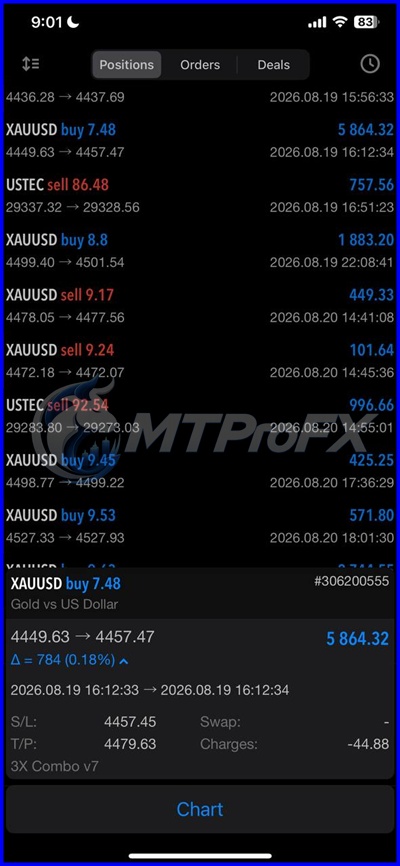
Backtest Results
Final Verdict – Is 3X COMBO AI EA v7.60 MT5 Worth It?
Its biggest advantage is flexibility: traders can experiment with different pairs, timeframes, risk parameters, and trading configurations rather than relying exclusively on manual execution.
However, automated trading is not risk-free. Grid and hedging strategies can create significant exposure when markets move strongly in one direction. For this reason, users should begin with conservative settings, conduct extensive backtesting, use demo accounts for forward testing, and only consider live trading after understanding the EA's behavior and potential drawdown.
What's Included
Login to add your review.
"I've been running this EA on XAUUSD for several weeks, and the execution has been smooth. The risk management features are impressive."
I've been using 3X Combo AI EA MT5 for several weeks, and the AI-driven entries have been surprisingly consistent. Easy to install and configure.